
騰訊安全威脅情報中心推出2021年12月必修安全漏洞清單
騰訊安全威脅情報中心推出2021年12月份必修安全漏洞清單,所謂必修漏洞,就是運維人員必須修復、不可拖延、影響范圍較廣的漏洞,不修復就意味著黑客攻擊入侵后會造成十分嚴重的后果。
騰訊安全威脅情報中心參考“安全漏洞的危害及影響力、漏洞技術細節披露情況、該漏洞在安全技術社區的討論熱度”等因素,綜合評估該漏洞在攻防實戰場景的風險。當漏洞綜合評估為風險嚴重、影響面較廣、技術細節已披露,且被安全社區高度關注時,就將該漏洞列為必修安全漏洞候選清單。
騰訊安全威脅情報中心定期發布安全漏洞必修清單,以此指引政企客戶安全運維人員修復漏洞,從而避免重大損失。
以下是2021年12月份必修安全漏洞清單:
一、Apache Log4j安全漏洞
概述:
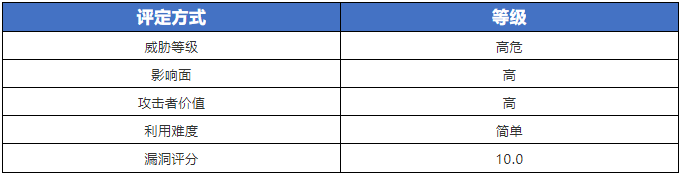
騰訊安全檢測發現自2021年12月09日開始,Apache官方發布通告,披露了多個安全漏洞(CVE-2021-44228/CVE-2021-4104/CVE-2021-45046/ CVE-2021-45105/ CVE-2021-44832),目前漏洞細節已被公開,攻擊者可利用該系列漏洞在目標服務器上執行任意代碼或對其進行拒絕服務攻擊。
因該組件使用極為廣泛,利用門檻很低,危害極大,騰訊安全專家建議所有用戶盡快升級到安全版本。
Apache Log4j是一個基于Java的日志記錄工具。該工具重寫了Log4j框架,并且引入了大量豐富的特性。該日志框架被大量用于業務系統開發,用來記錄日志信息。大多數情況下,開發者可能會將用戶輸入導致的錯誤信息寫入日志中。
漏洞狀態:

風險等級:
影響版本:
CVE-2021-44228:
- 2.0-beta9 <= Apache Log4j <= 2.3
- 2.4 <= Apache Log4j <= 2.12.1
- 2.13.0<= Apache Log4j <= 2.15.0-rc1
CVE-2021-45046:
- 2.0-beta9 <= Apache Log4j <= 2.3
- 2.4 <= Apache Log4j <= 2.12.1
- 2.13.0<= Apache Log4j <= 2.15.0-rc2(2.15.0穩定版)
CVE-2021-45105:
- 2.0-alpha1 <= Apache Log4j <=2.3
- 2.4 <= Apache Log4j <= 2.12.2-rc1(2.12.2穩定版)
- 2.13.0<= Apache Log4j <= 2.16.0
CVE-2021-4104:
- Apache Log4j =1.2.x
CVE-2021-44832:
- 2.0-beta7 <= Apache Log4j <=2.3.1
- 2.4 <= Apache Log4j <= 2.12.3-rc1(2.12.3穩定版)
- 2.13.0<= Apache Log4j <= 2.17.0
修復建議:
根據影響版本中的信息,排查并升級到安全版本:Apache Log4j 2.17.1(穩定版)。
官方下載鏈接為:https://github.com/apache/logging-log4j2/tags
https://logging.apache.org/log4j/2.x/download.html
二、Grafana 任意文件讀取漏洞
概述:
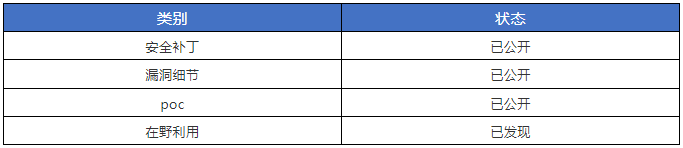
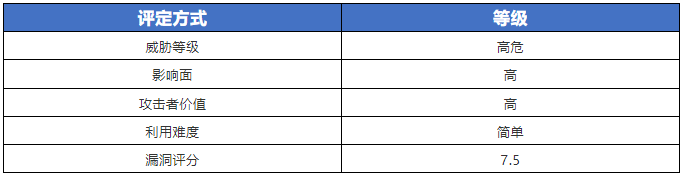
2021年12月6日,國外安全研究人員披露Grafana中某些接口在提供靜態文件時,攻擊者通過構造惡意請求,可造成目錄遍歷,可任意讀取系統文件,漏洞威脅等級:高危。
騰訊安全專家對該漏洞進行復現驗證,Grafana的任意插件都可以觸發,官方已發布補丁,騰訊安全專家建議受影響用戶盡快升級。
Grafana是一個跨平臺、開源的數據可視化網絡應用程序平臺。用戶配置連接的數據源之后,Grafana可以在網絡瀏覽器里顯示數據圖表和警告。
漏洞狀態:
風險等級:
影響版本:
- Grafana 8.x的版本受影響
修復建議:
根據影響版本中的信息,排查并升級到安全版本Grafana 8.3.1、8.2.7、8.1.8 和 8.0.7 版本。
補丁下載鏈接:
https://grafana.com/blog/2021/12/07/grafana-8.3.1-8.2.7-8.1.8-and-8.0.7-released-with-high-severity-security-fix/
三、Windows Active Directory域服務權限提升漏洞
概述:
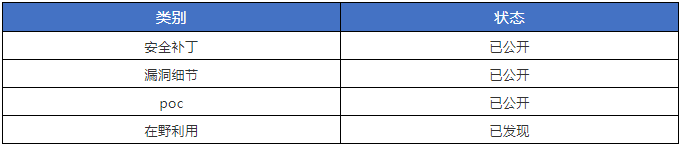
2021年12月13日,國外安全研究人員披露了Active Directory Domain Services權限提升漏洞(CVE-2021-42287、CVE-2021-42278)的 POC和漏洞細節,攻擊者利用該漏洞可以從域內普通用戶權限提升到域管理員權限。
微軟已于2021年11月發布該漏洞的補丁,騰訊安全專家建議受影響用戶盡快升級。
漏洞等級:高危。
漏洞狀態:
風險等級:

影響版本:
CVE-2021-42287:
- Windows Server 2012 R2 (Server Core installation)
- Windows Server 2012 R2
- Windows Server 2012 (Server Core installation)
- Windows Server 2008 R2 for x64-based Systems Service Pack 1(Server Core installation)
- Windows Server 2012
- Windows Server 2008 R2 for x64-based Systems Service Pack 1
- Windows Server 2008 for x64-based Systems Service Pack 2(Server Core installation)
- Windows Server 2008 for x64-based Systems Service Pack 2
- Windows Server 2008 for 32-bit Systems Service Pack 2(Server Core installation)
- Windows Server 2008 for 32-bit Systems Service Pack 2
- Windows Server 2016 (Server Core installation)
- Windows Server 2016
- Windows Server, version 20H2 (Server Core Installation)
- Windows Server, version 2004 (Server Core installation)
- Windows Server 2022 (Server Core installation)
- Windows Server 2022
- Windows Server 2019 (Server Core installation)
- Windows Server 2019
CVE-2021-42278:
- Windows Server 2012 R2 (Server Core installation)
- Windows Server 2012 R2
- Windows Server 2012 (Server Core installation)
- Windows Server 2012
- Windows Server 2008 R2 for x64-based Systems Service Pack 1 (Server Core installation)
- Windows Server 2008 R2 for x64-based Systems Service Pack 1
- Windows Server 2008 for x64-based Systems Service Pack 2 (Server Core installation)
- Windows Server 2008 for x64-based Systems Service Pack 2
- Windows Server 2008 for 32-bit Systems Service Pack 2 (Server Core installation)
- Windows Server 2008 for 32-bit Systems Service Pack 2
- Windows Server 2016 (Server Core installation)
- Windows Server 2016
- Windows Server, version 20H2 (Server Core Installation)
- Windows Server, version 2004 (Server Core installation)
- Windows Server 2022 (Server Core installation)
- Windows Server 2022
- Windows Server 2019 (Server Core installation)
- Windows Server 2019
修復建議:
微軟已發布相關補丁,使用Windows自動更新修復以上漏洞,官方鏈接:
https://msrc.microsoft.com/update-guide/vulnerability/CVE-2021-42287
https://msrc.microsoft.com/update-guide/vulnerability/CVE-2021-42278
四、Apache APISIX Dashboard 未授權訪問漏洞
概述:
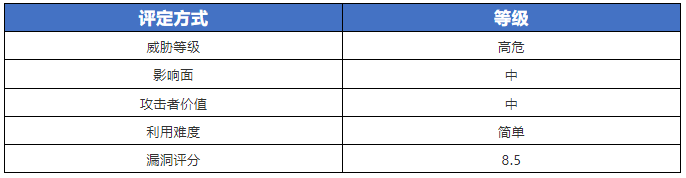
騰訊安全近期監測發現Apache官方披露了Apache APISIX Dashboard 未授權訪問漏洞(CVE-2021-45232)的風險通告,利用此漏洞攻擊者無需登錄Apache APISIX Dashboard即可訪問某些接口,從而進行未經授權的更改或獲取Apache APISIX Route、Upstream、Service等相關配置信息,導致SSRF、攻擊者構建的惡意流量代理等問題任意代碼執行。漏洞CVSS評分:8.5。
Apache APISIX是一個開源API網關,Apache APISIX Dashboard設計的目的是讓用戶通過前端界面盡可能輕松地操作Apache APISIX。
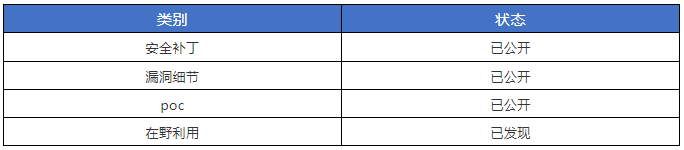
漏洞狀態:
風險等級:
影響版本:
- Apache APISIX Dashboard versions 2.7 - 2.10
修復建議:
根據影響版本中的信息,排查并升級到Apache APISIX Dashboard version 2.10.1及以上版本。
五、Apache HTTP Server安全漏洞
概述:
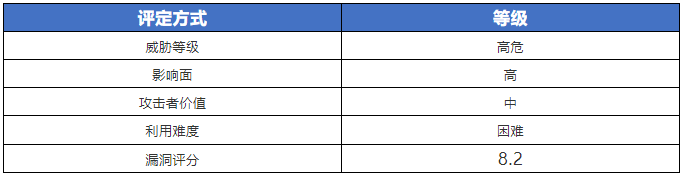
騰訊安全監測發現Apache官方發布安全公告披露了Apache HTTP Server服務器端請求偽造漏洞(CVE-2021-44224)和Apache HTTP Server緩沖區溢出漏洞(CVE-2021-44790),漏洞威脅等級:高危,CVSS評分8.2。
Apache HTTP Server服務器端請求偽造漏洞(CVE-2021-44224):攻擊者利用此漏洞可能導致遠程服務器觸發空指針引用或SSRF。
Apache HTTP Server緩沖區溢出漏洞(CVE-2021-44790):攻擊者可構造特殊的數據包觸發服務器中mod_lua解析器的緩沖區溢出漏洞,攻擊者可能通過該漏洞實現任意代碼執行。
Apache HTTP Server是Apache軟件基金會的一個開放源碼的網頁服務器軟件,可以在大多數電腦操作系統中運行。由于其跨平臺和安全性,被廣泛使用,是最流行的Web服務器軟件之一。
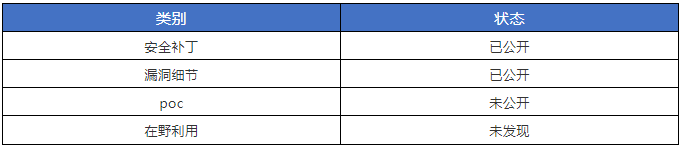
漏洞狀態:
風險等級:
影響版本:
- CVE-2021-44224: Apache HTTP Server >=2.4.7, <=2.4.51
- CVE-2021-44790: Apache HTTP Server <=2.4.51
修復建議:
根據影響版本中的信息,排查并升級到安全版本:
Apache HTTP Server 2.4.52
https://httpd.apache.org/download.cgi#apache24
六、Chromium遠程代碼執行漏洞
概述:
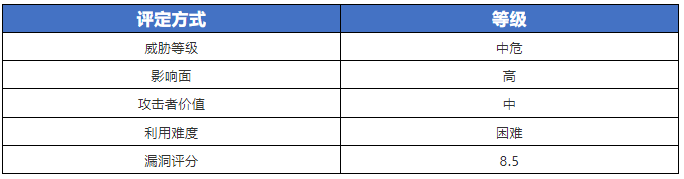
騰訊安全監測發現微軟/谷歌官方發布公告披露了Chromium V8引擎存在UAF漏洞(CVE-2021-4102),攻擊者可利用此漏洞在未開啟沙箱的程序里實現任意代碼執行。
V8是一個由Google開發的開源JavaScript引擎,用于Google Chrome及Chromium中。
漏洞狀態:
?
風險等級:
影響版本:
Chromium版本 < 96.0.4664.110
修復建議:
根據影響版本中的信息,排查并升級到安全版本:
Chromium版本: 96.0.4664.110
七、MinIO 權限提升漏洞
概述:
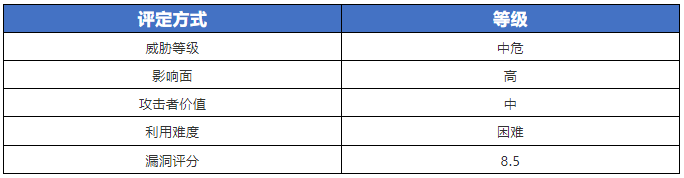
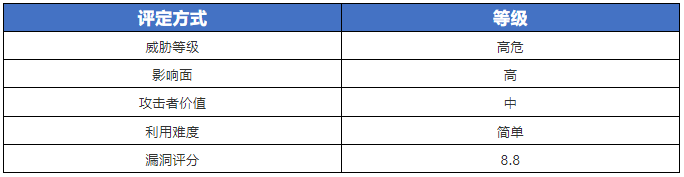
騰訊安全監測發現MinIO官方發布安全通告,披露了MinIO存在權限提升漏洞(CVE-2021-43858),攻擊者可利用此漏洞完成特權提升,漏洞威脅等級:高危,CVSS評分8.8。
MinIO是根據GNU Affero通用公共許可證v3.0發布的高性能對象存儲。它與Amazon S3云存儲服務兼容的API。它可以處理最大支持對象大小為5TB的非結構化數據,例如照片,視頻,日志文件,備份和容器映像。
漏洞狀態:
 ?
?
風險等級:
影響版本:
MinIO < RELEASE.2021-12-27T07-23-18Z
修復建議:
根據影響版本中的信息,排查并升級到安全版本:
MinIO >= RELEASE.2021-12-27T07-23-18Z
八、Windows Installer特權提升漏洞
概述:
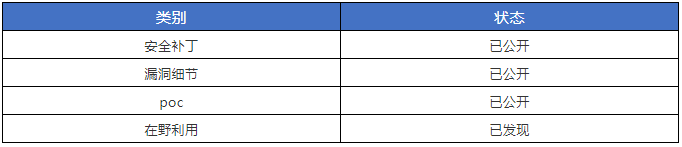
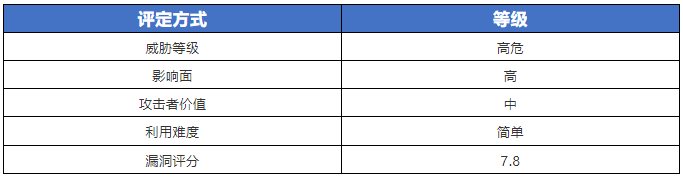
12月16日,騰訊安全監測發現微軟官網發布公告已完成Windows Installer特權提升0day(CVE-2021-43883)的安全補丁,由于該漏洞已被國外安全研究人員公開相關細節及漏洞利用代碼,利用此漏洞可以完成權限提升。騰訊安全專家建議所有用戶盡快升級到安全版本。漏洞威脅等級:高危,CVSS評分7.8。
漏洞狀態:
 ?
?
風險等級:
影響版本:
- Windows Server 2012 R2 (Server Core installation)
- Windows Server 2012 R2
- Windows Server 2012 (Server Core installation)
- Windows Server 2012
- Windows Server 2008 R2 for x64-based Systems Service Pack 1 (Server Core installation)
- Windows Server 2008 R2 for x64-based Systems Service Pack 1
- Windows Server 2008 for x64-based Systems Service Pack 2 (Server Core installation)
- Windows Server 2008 for x64-based Systems Service Pack 2
- Windows Server 2008 for 32-bit Systems Service Pack 2 (Server Core installation)
- Windows Server 2008 for 32-bit Systems Service Pack 2
- Windows RT 8.1
- Windows 8.1 for x64-based systems
- Windows 8.1 for 32-bit systems
- Windows 7 for x64-based Systems Service Pack 1
- Windows 7 for 32-bit Systems Service Pack 1
- Windows Server 2016 (Server Core installation)
- Windows Server 2016
- Windows 10 Version 1607 for x64-based Systems
- Windows 10 Version 1607 for 32-bit Systems
- Windows 10 for x64-based Systems
- Windows 10 for 32-bit Systems
- Windows 10 Version 21H2 for x64-based Systems
- Windows 10 Version 21H2 for ARM64-based Systems
- Windows 10 Version 21H2 for 32-bit Systems
- Windows 11 for ARM64-based Systems
- Windows 11 for x64-based Systems
- Windows Server, version 20H2 (Server Core Installation)
- Windows 10 Version 20H2 for ARM64-based Systems
- Windows 10 Version 20H2 for 32-bit Systems
- Windows 10 Version 20H2 for x64-based Systems
- Windows Server, version 2004 (Server Core installation)
- Windows 10 Version 2004 for x64-based Systems
- Windows 10 Version 2004 for ARM64-based Systems
- Windows 10 Version 2004 for 32-bit Systems
- Windows Server 2022 (Server Core installation)
- Windows Server 2022
- Windows 10 Version 21H1 for 32-bit Systems
- Windows 10 Version 21H1 for ARM64-based Systems
- Windows 10 Version 21H1 for x64-based Systems
- Windows 10 Version 1909 for ARM64-based Systems
- Windows 10 Version 1909 for x64-based Systems
- Windows 10 Version 1909 for 32-bit Systems
- Windows Server 2019 (Server Core installation)
- Windows Server 2019
- Windows 10 Version 1809 for ARM64-based Systems
- Windows 10 Version 1809 for x64-based Systems
- Windows 10 Version 1809 for 32-bit Systems
修復建議:
微軟已發布相關補丁,使用Windows自動更新修復以上漏洞,官方鏈接:
https://msrc.microsoft.com/update-guide/vulnerability/CVE-2021-43883
通用的漏洞修復、防御方案建議
騰訊安全專家推薦用戶參考相關安全漏洞風險通告提供的建議及時升級修復漏洞,推薦企業安全運維人員通過騰訊云原生安全產品檢測漏洞、防御漏洞武器攻擊。具體操作步驟可參考以下文章指引:https://s.tencent.com/research/report/157
