
【收藏】Linux服務器巡檢的重要性,附腳本!
VSole2022-04-09 22:10:44
前言:
Linux服務器是系統重要的業務運行平臺,對服務器進行巡檢能夠及時發現服務器的隱患,以便于改善和優化服務器的性能;觀察服務器的運行狀況,及時對設備進行調整,保證服務器的24小時不間斷的工作;以及采集網內服務器信息。在此,為了便于運維人員順利的完成服務器巡檢工作,小編寫了此文檔,希望對Linux服務器的巡檢工作起到指導、幫助的作用。
一、巡檢項目
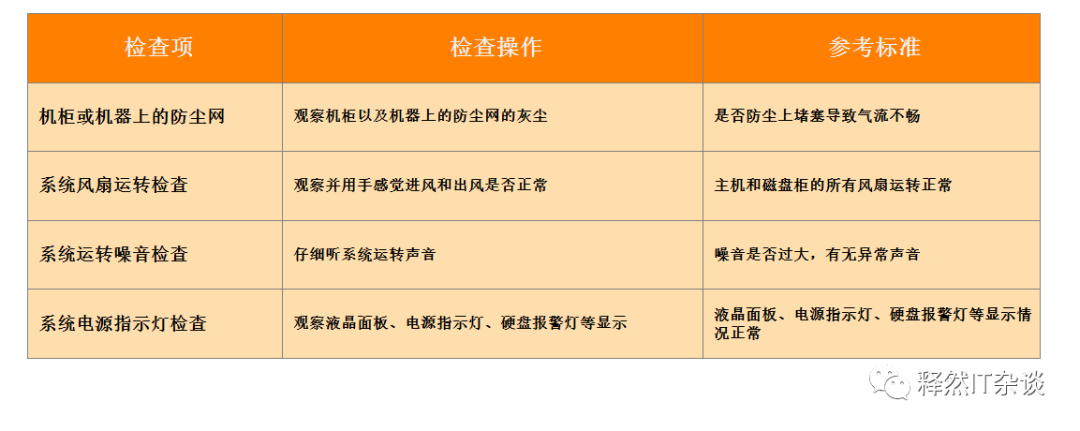
1、服務器硬件檢查
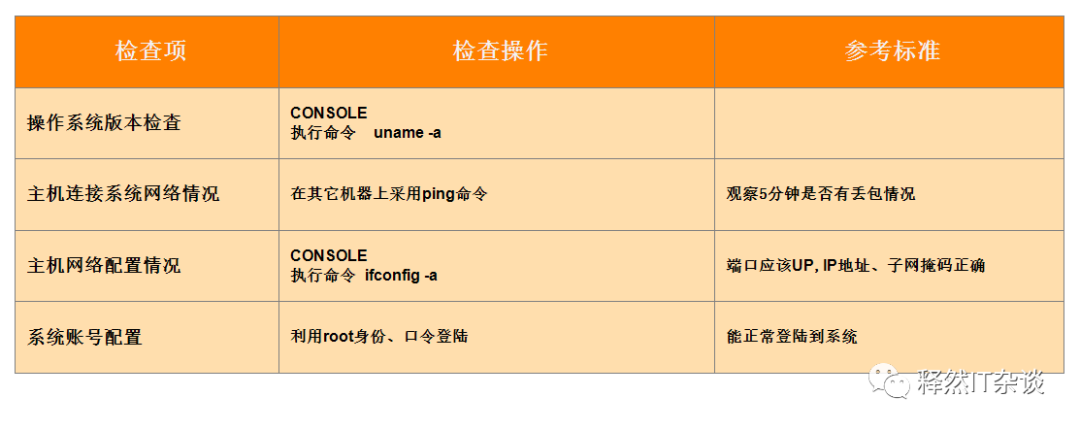
2.操作系統檢查
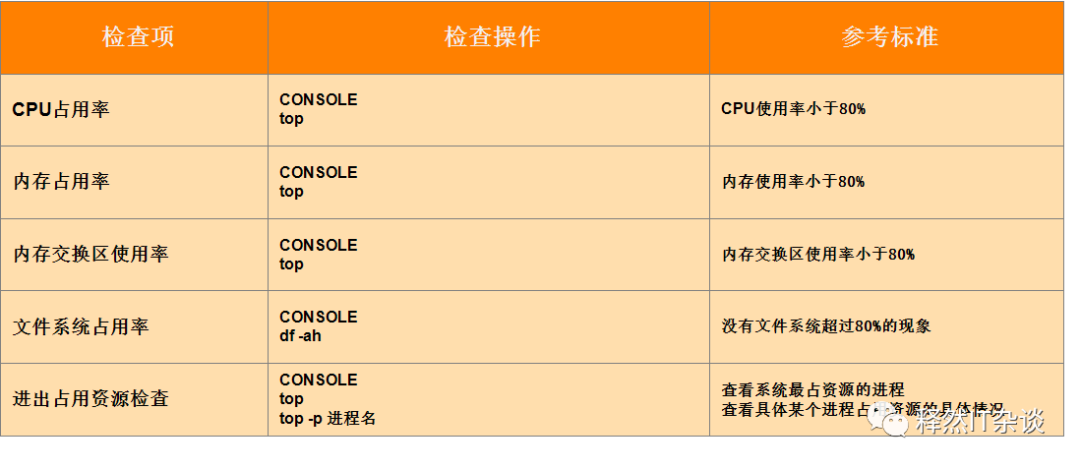
3.性能檢查
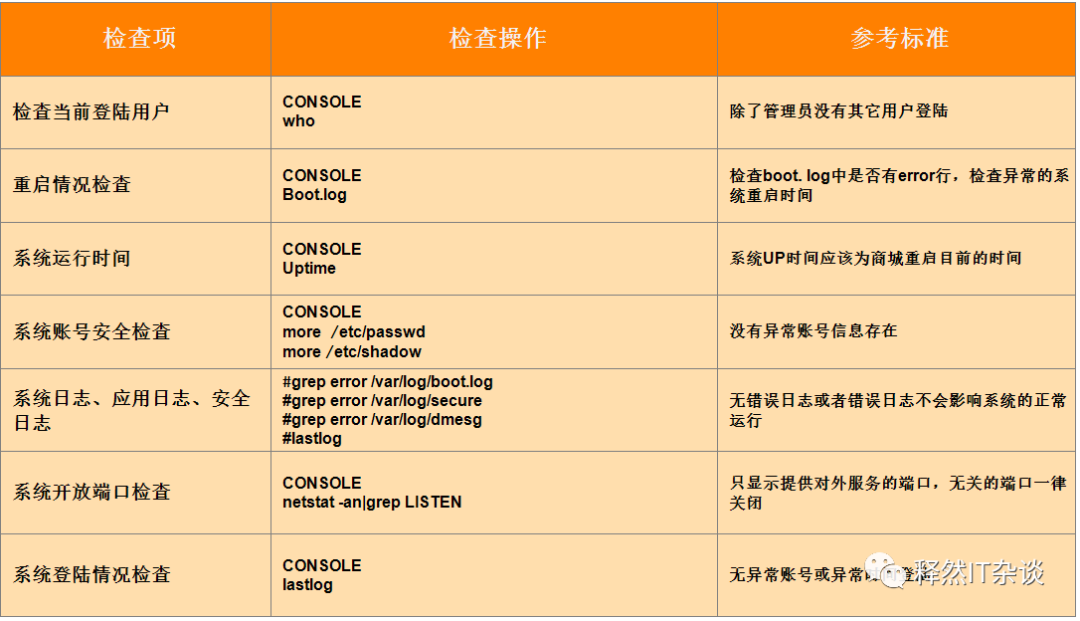
4.安全檢查
二、收集的腳本
巡檢項信息如下(也可自行添加收集信息的模塊):
1)、系統基本信息
2)、cpu信息
3)、ip網絡信息
4)、cpu使用率
5)、連接數信息
6)、系統限制信息
7)、內存使用信息
8)、磁盤使用信息
9)、網絡流量情況/系統資源變化
10)、cpu消耗情況前10排行
11)、cpu消耗按內存情況前10排行
12)、磁盤io情況
13)、系統定時任務列表
14)、系統定時任務腳本內容
腳本使用前注意事項
需要使用root用戶執行 下載腳本:
- 使用說明
腳本中 ifconfig、mpstat、iostat命令有依賴,需要安裝相關依賴包
yum -y install bc sysstat net-tools
- 執行chmod 777 oswatch.sh;然后直接sh oswatch.sh執行;

- 執行完巡檢之后,將在腳本所在的路徑下生成html巡檢結果報告,如下:

腳本內容如下:
#!/bin/bash
ipaddress=`ip a|grep "global"|awk '{print $2}' |awk -F/ '{print $1}'`
file_output=${ipaddress}'_os_linux_summary.html'
td_str=''
th_str=''
yum -y install bc sysstat net-tools;
sleep 10;
create_html_css(){
  echo -e "
"
}
create_html_head(){
echo -e "
$1
"
}
create_table_head1(){
  echo -e "68%" border="1" bordercolor="#000000" cellspacing="0px" style="border-collapse:collapse">"}
create_table_head2(){
  echo -e "
"100%" border="
1
" bordercolor="
#000000" cellspacing="0px" style="border-collapse:collapse">"
}
create_td(){
    td_str=`echo $1 | awk 'BEGIN{FS="|"}''{i=1; while(i<=NF) {print "
";i++}}'`}
create_th(){
    th_str=`echo $1|awk 'BEGIN{FS="|"}''{i=1; while(i<=NF) {print "
";i++}}'`}
create_tr1(){
  create_td "$1"
  echo -e "
    $td_str

" >> $file_output}
create_tr2(){
  create_th "$1"
  echo -e "
    $th_str

" >> $file_output}
create_tr3(){
  echo -e "
" >> $file_output}
create_table_end(){
  echo -e "
"$i""$i"
  `cat $1`

"
}
create_html_end(){
  echo -e ""
}
NAME_VAL_LEN=12
name_val () {
   printf "%+*s | %s" "${NAME_VAL_LEN}" "$1" "$2"
}
get_physics(){
    name_val "巡檢時間" "`date`"
    name_val "主機名" "`uname -n`"
    name_val "系統版本" "`cat /etc/{oracle,redhat,SuSE,centos}-release 2>/dev/null|sort -ru|head -n1`"
    name_val "內核版本" "`uname -r`"
    name_val "架構" "CPU=`lscpu|grep Architecture|awk -F: '{print $2}'|sed 's/^[[:space:]]*//g'`;OS=`getconf LONG_BIT`-bit"
}
get_cpuinfo () {
   file="/proc/cpuinfo"
   virtual=`grep -c ^processor "${file}"`
   physical=`grep 'physical id' "${file}" | sort -u | wc -l`
   cores=`grep 'cpu cores' "${file}" | head -n 1 | cut -d: -f2`
   model=`grep "model name" "${file}"|sort -u|awk -F: '{print $2}'`
   speed=`grep -i "cpu MHz" "${file}"|sort -u|awk -F: '{print $2}'`
   cache=`grep -i "cache size" "${file}"|sort -u|awk -F: '{print $2}'`
   SysCPUIdle=`vmstat | sed -n '$ p' | awk '{print $15}'`
   [ "${physical}" = "0" ] && physical="${virtual}"
   [ -z "${cores}" ] && cores=0
   cores=$((${cores} * ${physical}));
   htt=""
   if [ ${cores} -gt 0 -a $cores -lt $virtual ]; then htt=yes; else htt=no; fi
   name_val "線程" "physical = ${physical}, cores = ${cores}, virtual = ${virtual}, hyperthreading = ${htt}"
   name_val "cpu型號" "${physical} x ${model}"
   name_val "速度" "${virtual} x ${speed} MHz"
   name_val "緩存" "${virtual} x ${cache}"
   name_val "CPU空閑率(%)" "${SysCPUIdle}%"
}
get_netinfo(){
   echo "interface | status | ipadds     |      mtu    |  Speed     |     Duplex" >>/tmp/tmpnet_h1_`date +%y%m%d`.txt
   for ipstr in `ifconfig -a|grep ": flags"|awk  '{print $1}'|sed 's/.$//'`
   do
      ipadds=`ifconfig ${ipstr}|grep -w inet|awk '{print $2}'`
      mtu=`ifconfig ${ipstr}|grep mtu|awk '{print $NF}'`
      speed=`ethtool ${ipstr}|grep Speed|awk -F: '{print $2}'`
      duplex=`ethtool ${ipstr}|grep Duplex|awk -F: '{print $2}'`
      echo "${ipstr}"  "up" "${ipadds}" "${mtu}" "${speed}" "${duplex}"\
      |awk '{print $1,"|", $2,"|", $3,"|", $4,"|", $5,"|", $6}'  >>/tmp/tmpnet1_`date +%y%m%d`.txt
   done
}
get_cpuuse(){
   echo "#######################################  cpu使用率  #######################################" >>/tmp/tmp_cpuuse_`date +%y%m%d`.txt
   mpstat -P ALL 10 8 >>/tmp/tmp_cpuuse_`date +%y%m%d`.txt
}
get_connections (){
  filemax=`cat /proc/sys/fs/file-max`
  name_val "Number of concurrent connections" "${filemax}"
}
get_ulimitinfo(){
   echo "#######################################  系統限制最大進程數  #######################################" >>/tmp/tmp_ulimitinfo_`date +%y%m%d`.txt
   ulimit -a >>/tmp/tmp_ulimitinfo_`date +%y%m%d`.txt
   echo "#######################################  env  #######################################" >>/tmp/tmp_ulimitinfo_`date +%y%m%d`.txt
   env >>/tmp/tmp_ulimitinfo_`date +%y%m%d`.txt
}
get_meminfo(){
   echo "Locator   |Size     |Speed       |Form Factor  | Type      |    Type Detail" >>/tmp/tmpmem3_h1_`date +%y%m%d`.txt
   dmidecode| grep -v "Memory Device Mapped Address"|grep -A12 -w "Memory Device" \
   |egrep "Locator:|Size:|Speed:|Form Factor:|Type:|Type Detail:" \
   |awk -F: '/Size|Type|Form.Factor|Type.Detail|^[\t ]+Locator/{printf("|%s", $2)}/^[\t ]+Speed/{print "|" $2}' \
   |grep -v "No Module Installed" \
   |awk -F"|" '{print $4,"|", $2,"|", $7,"|", $3,"|", $5,"|", $6}' >>/tmp/tmpmem3_t1_`date +%y%m%d`.txt
   free -glht >>/tmp/tmpmem2_`date +%y%m%d`.txt
   memtotal=`vmstat -s | head -1 | awk '{print $1}'`
   avm=`vmstat -s| sed -n '3p' | awk '{print $1}'`
   name_val "Mem_used_rate(%)" "`echo "100*${avm}/${memtotal}" | bc`%" >>/tmp/tmpmem1_`date +%y%m%d`.txt

}
get_diskinfo(){
   echo "Filesystem        |Type   |Size |  Used  | Avail | Use%  | Mounted on | Opts" >>/tmp/tmpdisk_h1_`date +%y%m%d`.txt
   df -ThP|grep -v tmpfs|sed '1d'|sort >/tmp/tmpdf1_`date +%y%m%d`.txt
   mount -l|awk '{print $1,$6}'|grep ^/|sort >/tmp/tmpdf2_`date +%y%m%d`.txt
   join /tmp/tmpdf1_`date +%y%m%d`.txt /tmp/tmpdf2_`date +%y%m%d`.txt\
   |awk '{print $1,"|", $2,"|", $3,"|", $4,"|", $5,"|", $6,"|", $7,"|", $8}' >>/tmp/tmpdisk_t1_`date +%y%m%d`.txt
   lsblk >>/tmp/tmpdisk1_`date +%y%m%d`.txt
   for disk in `ls -l /sys/block|awk '{print $9}'|sed '/^$/d'|grep -v fd`
   do
      echo "${disk}" `cat /sys/block/${disk}/queue/scheduler`  >>/tmp/tmpdisk2_`date +%y%m%d`.txt
   done
  echo "==========df -h============" >>/tmp/tmpdisk2_`date +%y%m%d`.txt
  df -h >>/tmp/tmpdisk2_`date +%y%m%d`.txt
  echo "==========mount============" >>/tmp/tmpdisk2_`date +%y%m%d`.txt
  mount >>/tmp/tmpdisk2_`date +%y%m%d`.txt
  echo "==========fdisk -l============" >>/tmp/tmpdisk2_`date +%y%m%d`.txt
  fdisk -l >>/tmp/tmpdisk2_`date +%y%m%d`.txt
   pvs >>/tmp/tmpdisk3_`date +%y%m%d`.txt
   echo "======================  =====  =====  =====  =====  =====  ==========  =======" >>/tmp/tmpdisk3_`date +%y%m%d`.txt
   vgs >>/tmp/tmpdisk3_`date +%y%m%d`.txt
   echo "======================  =====  =====  =====  =====  =====  ==========  =======" >>/tmp/tmpdisk3_`date +%y%m%d`.txt
   lvs >>/tmp/tmpdisk3_`date +%y%m%d`.txt
}
   ##xiao changge
get_topproc(){
   #os load
   echo "#######################################  網絡流量情況  #######################################" >>/tmp/tmpload_`date +%y%m%d`.txt
   sar -n DEV 10 6 >>/tmp/tmpload_`date +%y%m%d`.txt
   echo "#######################################  ip add  #######################################" >>/tmp/tmpload_`date +%y%m%d`.txt
   ip add >>/tmp/tmpload_`date +%y%m%d`.txt
   echo "#######################################  ss -t -a  #######################################" >>/tmp/tmpload_`date +%y%m%d`.txt
   ss -t -a  >>/tmp/tmpload_`date +%y%m%d`.txt
   echo "#######################################  netstat -lntp  #######################################" >>/tmp/tmpload_`date +%y%m%d`.txt
   netstat -lntp  >>/tmp/tmpload_`date +%y%m%d`.txt
   echo "#######################################  netstat -anp  #######################################" >>/tmp/tmpload_`date +%y%m%d`.txt
   netstat -anp  >>/tmp/tmpload_`date +%y%m%d`.txt
   echo "#######################################  netstat -rn  #######################################" >>/tmp/tmpload_`date +%y%m%d`.txt
   netstat -rn  >>/tmp/tmpload_`date +%y%m%d`.txt
   echo "#######################################  系統資源變化  #######################################" >>/tmp/tmptop_`date +%y%m%d`.txt
   vmstat -S M 10 6  >>/tmp/tmptop_`date +%y%m%d`.txt
   mpstat 1 5 >>/tmp/tmptop_`date +%y%m%d`.txt
   echo "#######################################  消耗CPU前十排行  #######################################" >>/tmp/tmptop_`date +%y%m%d`.txt
   ps aux|head -1 >>/tmp/tmptop_`date +%y%m%d`.txt
   ps aux|grep -v PID|sort -rn -k +3|head  >>/tmp/tmptop_`date +%y%m%d`.txt
   sleep 2;
   echo "#######################################  消耗內存前十排行  #######################################" >>/tmp/tmptop_`date +%y%m%d`.txt
   ps aux|head -1  >>/tmp/tmptop_`date +%y%m%d`.txt
   ps aux|grep -v PID|sort -rn -k +4|head  >>/tmp/tmptop_`date +%y%m%d`.txt
   sleep 2;
   echo "#######################################  TOP資源監控  #######################################" >>/tmp/tmptop_`date +%y%m%d`.txt
   top -bn1 -o "%CPU"|sed  -n '1,80p' >>/tmp/tmptop_`date +%y%m%d`.txt
   sleep 2;
  echo "#######################################  顯示進程信息ps -ef  #######################################" >>/tmp/tmptop_`date +%y%m%d`.txt
   ps -ef >>/tmp/tmptop_`date +%y%m%d`.txt
   sleep 2;

   #top i/o
   echo "#######################################  磁盤io情況  #######################################" >>/tmp/tmptopio_`date +%y%m%d`.txt
   iostat -k -d 10 5  >>/tmp/tmptopio_`date +%y%m%d`.txt
}
get_crontablist(){
   crontab -l >>/tmp/tmp_crontab_`date +%y%m%d`.txt
  if [ -s /tmp/tmp_crontab_`date +%y%m%d`.txt ] ; then
    echo 'ths file is not empyt and file info'
  else
    echo '#### 無定時任務 ####' >>/tmp/tmp_crontab_`date +%y%m%d`.txt
  fi
}
get_crontab_content(){
   crontab_content_log=/tmp/tmp_crontab_content_`date +%y%m%d`.txt
   crontab -l|awk -F ' ' '{ print $NF}' >>$crontab_content_log
   contrab_num=`crontab -l|awk -F ' ' '{ print $NF}'|wc -l`
   if [ $contrab_num -ne 0 ];then
   count=1
   while [ $count -le $contrab_num ]
     do
       echo "#######################################  獲取系統定時任務腳本 $count 內容開始  #######################################" >>/tmp/tmp_crontab_shellcontent_`date +%y%m%d`.txt
       cat `sed -n -e "${count}p" $crontab_content_log` >>/tmp/tmp_crontab_shellcontent_`date +%y%m%d`.txt
       echo -e "#######################################  獲取系統定時任務腳本 $count 內容結束  #######################################" >>/tmp/tmp_crontab_shellcontent_`date +%y%m%d`.txt
     count=$[${count}+1]
     done
   else
     echo '#### 無定時執行腳本 ####' >>/tmp/tmp_crontab_shellcontent_`date +%y%m%d`.txt
   fi
}
create_html(){
  rm -rf $file_output
  touch $file_output
  create_html_css >> $file_output

  create_html_head "系統基本信息" >> $file_output
  create_table_head1 >> $file_output
  get_physics >>/tmp/tmpos_summ_`date +%y%m%d`.txt
  while read line
  do
    create_tr1 "$line"
  done < /tmp/tmpos_summ_`date +%y%m%d`.txt
  create_table_end >> $file_output

  create_html_head "cpu信息" >> $file_output
  create_table_head1 >> $file_output
  get_cpuinfo >>/tmp/tmp_cpuinfo_`date +%y%m%d`.txt
  while read line
  do
    create_tr1 "$line"
  done < /tmp/tmp_cpuinfo_`date +%y%m%d`.txt
  create_table_end >> $file_output
  create_html_head "ip網絡信息" >> $file_output
  create_table_head1 >> $file_output
  get_netinfo
  while read line
  do
    create_tr2 "$line"
  done < /tmp/tmpnet_h1_`date +%y%m%d`.txt
  while read line
  do
    create_tr1 "$line"
  done < /tmp/tmpnet1_`date +%y%m%d`.txt
  create_table_end >> $file_output
  create_html_head "cpu使用率" >> $file_output
  create_table_head1 >> $file_output
  get_cpuuse
  create_tr3 "/tmp/tmp_cpuuse_`date +%y%m%d`.txt"
  create_table_end >> $file_output
  create_html_head "連接數信息" >> $file_output
  create_table_head1 >> $file_output
  get_connections >>/tmp/tmp_connections_`date +%y%m%d`.txt
  while read line
  do
    create_tr1 "$line"
  done < /tmp/tmp_connections_`date +%y%m%d`.txt
  create_table_end >> $file_output
  create_html_head "系統限制信息" >> $file_output
  create_table_head1 >> $file_output
  get_ulimitinfo
  create_tr3 "/tmp/tmp_ulimitinfo_`date +%y%m%d`.txt"
  create_table_end >> $file_output
  create_html_head "內存使用信息" >> $file_output
  create_table_head1 >> $file_output
  get_meminfo
  while read line
  do
    create_tr1 "$line"
  done < /tmp/tmpmem1_`date +%y%m%d`.txt
  create_table_end >> $file_output

  create_table_head1 >> $file_output
  create_tr3 "/tmp/tmpmem2_`date +%y%m%d`.txt"
  create_table_end >> $file_output

  create_table_head1 >> $file_output
  while read line
  do
    create_tr2 "$line"
  done < /tmp/tmpmem3_h1_`date +%y%m%d`.txt

  while read line
  do
    create_tr1 "$line"
  done < /tmp/tmpmem3_t1_`date +%y%m%d`.txt
  create_table_end >> $file_output

  create_html_head "磁盤使用信息" >> $file_output
  create_table_head1 >> $file_output
  get_diskinfo
  while read line
  do
    create_tr2 "$line"
  done < /tmp/tmpdisk_h1_`date +%y%m%d`.txt
  while read line
  do
    create_tr1 "$line"
  done < /tmp/tmpdisk_t1_`date +%y%m%d`.txt
  create_table_end >> $file_output

  create_table_head1 >> $file_output
  create_tr3 "/tmp/tmpdisk1_`date +%y%m%d`.txt"
  create_table_end >> $file_output

  create_table_head1 >> $file_output
  create_tr3 "/tmp/tmpdisk2_`date +%y%m%d`.txt"
  create_table_end >> $file_output

  create_table_head1 >> $file_output
  create_tr3 "/tmp/tmpdisk3_`date +%y%m%d`.txt"
  create_table_end >> $file_output
  create_html_head "網絡流量情況" >> $file_output
  create_table_head1 >> $file_output
  get_topproc
  create_tr3 "/tmp/tmpload_`date +%y%m%d`.txt"
  create_table_end >> $file_output

  create_html_head "性能相關監控" >> $file_output
  create_table_head1 >> $file_output
  sed -i 's/ "/tmp/tmptop_`date +%y%m%d`.txt"  >>/tmp/tmptop_`date +%y%m%d`.txt
  create_tr3 "/tmp/tmptop_`date +%y%m%d`.txt"
  create_table_end >> $file_output

  create_html_head "磁盤io情況" >> $file_output
  create_table_head1 >> $file_output
  create_tr3 "/tmp/tmptopio_`date +%y%m%d`.txt"
  create_table_end >> $file_output
  create_html_head "定時任務信息" >> $file_output
  create_table_head1 >> $file_output
  get_crontablist
  create_tr3 "/tmp/tmp_crontab_`date +%y%m%d`.txt"
  create_table_end >> $file_output
  create_html_head "定時任務腳本內容" >> $file_output
  create_table_head1 >> $file_output
  get_crontab_content
  create_tr3 "/tmp/tmp_crontab_shellcontent_`date +%y%m%d`.txt"
  create_table_end >> $file_output
  create_html_end >> $file_output
  sed -i 's/BORDER=1/width="68%" border="1" bordercolor="#000000" cellspacing="0px" style="border-collapse:collapse"/g' $file_output
  rm -rf /tmp/tmp*_`date +%y%m%d`.txt
}
# This script must be executed as root
RUID=`id|awk -F\( '{print $1}'|awk -F\= '{print $2}'`
if [ ${RUID} != "0" ];then
    echo"This script must be executed as root"
    exit 1
fi
PLATFORM=`uname`
if [ ${PLATFORM} = "HP-UX" ] ; then
    echo "This script does not support HP-UX platform for the time being"
exit 1
elif [ ${PLATFORM} = "SunOS" ] ; then
    echo "This script does not support SunOS platform for the time being"
exit 1
elif [ ${PLATFORM} = "AIX" ] ; then
    echo "This script does not support AIX platform for the time being"
exit 1
elif [ ${PLATFORM} = "Linux" ] ; then
  create_html
fi
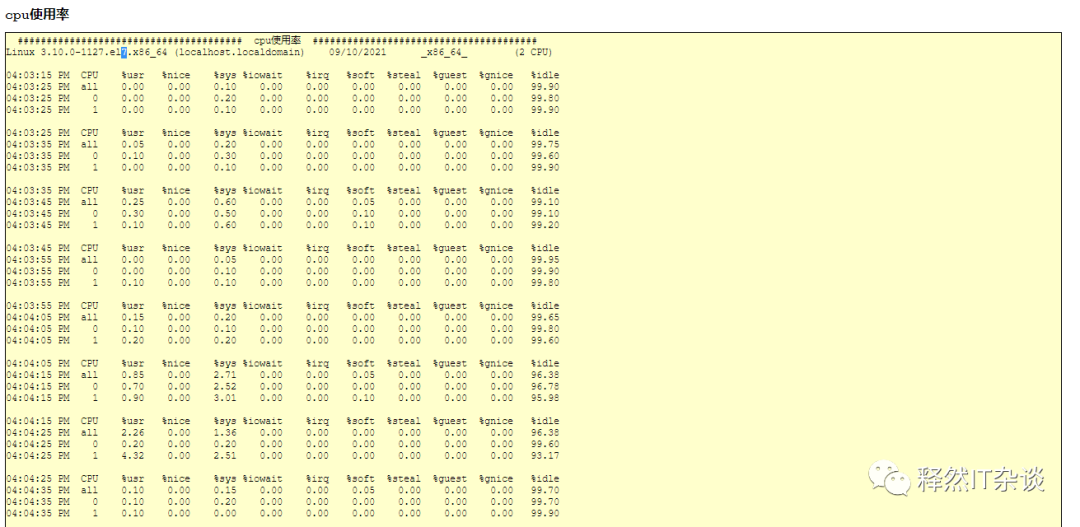
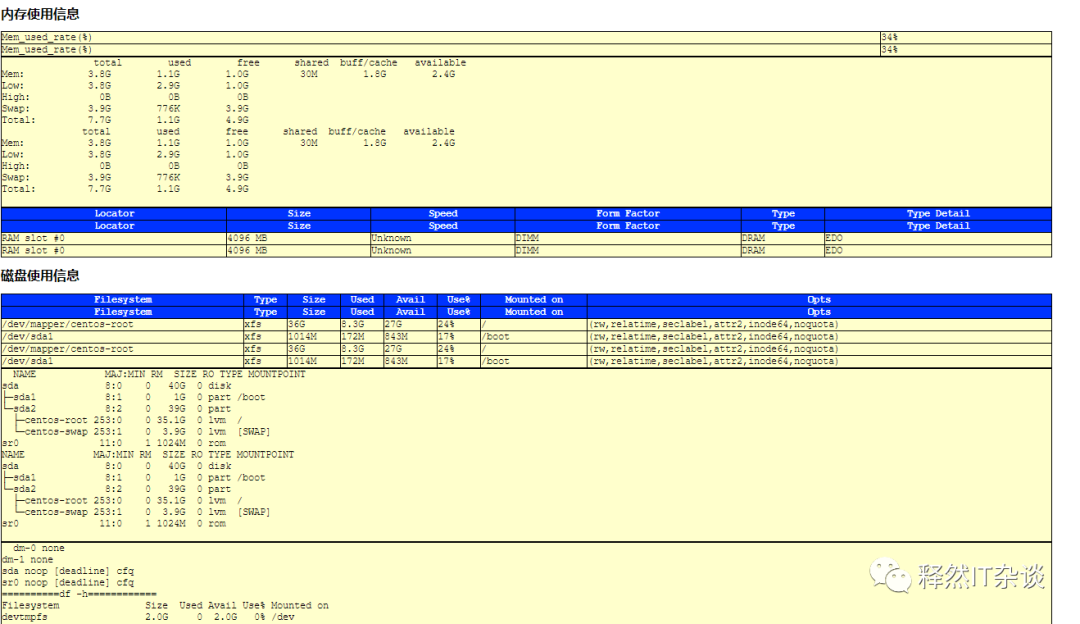
執行完成后html展示截圖:



Linux腳本鏈接:
https://pan.baidu.com/s/13eNUtJrVBo6DRdLenoWGDw
提取碼:
hm8u

VSole
網絡安全專家