
linux跟蹤技術之ebpf
ebpf簡介
eBPF是一項革命性的技術,起源于 Linux 內核,可以在操作系統內核等特權上下文中運行沙盒程序。它可以安全有效地擴展內核的功能,而無需更改內核源代碼或加載內核模塊。比如,使用ebpf可以追蹤任何內核導出函數的參數,返回值,以實現kernel hook 的效果;通過ebpf,還可以在網絡封包到達內核協議棧之前就進行處理,這可以實現流量控制,甚至隱蔽通信。
ebpf追蹤
ebpf本質上只是運行在linux 內核中的虛擬機,要發揮其強大的能力還是要跟linux kernel 自帶的追蹤功能搭配:
- ? kprobe
- ? uprobe
- ? tracepoint
- ? USDT
通常可以通過以下三種工具使用ebpf:
- ? bcc
- ? libbpf
- ? bpftrace
bcc
BCC 是一個用于創建高效內核跟蹤和操作程序的工具包,包括幾個有用的工具和示例。它利用擴展的 BPF(Berkeley Packet Filters),正式名稱為 eBPF,這是 Linux 3.15 中首次添加的新功能。BCC 使用的大部分內容都需要 Linux 4.1 及更高版本。
源碼安裝bcc v0.25.0
首先clone bcc 源碼倉庫
git clone https://github.com/iovisor/bcc.git git checkout v0.25.0 git submodule init git submodule update
bcc 從v0.10.0開始使用libbpf 并通過submodule 的形式加入源碼樹,所以這里需要更新并拉取子模塊
安裝依賴
apt install flex bison libdebuginfod-dev libclang-14-dev
編譯bcc
mkdir build && cd build cmake -DCMAKE_BUILD_TYPE=Release .. make -j #n取決于機器的cpu核心數
編譯安裝完成后,在python3中就能使用bcc模塊了 安裝bcc時會在/usr/share/bcc目錄下安裝bcc自帶的示例腳本和工具腳本,以及manual 文檔 可以直接使用man -M /usr/share/bcc/man 來查詢
使用python + bcc 跟蹤內核函數
bcc 自帶的工具execsnoop可以跟蹤execv系統調用,其源代碼如下:
#!/usr/bin/python
# @lint-avoid-python-3-compatibility-imports
#
# execsnoop Trace new processes via exec() syscalls.
#           For Linux, uses BCC, eBPF. Embedded C.
#
# USAGE: execsnoop [-h] [-T] [-t] [-x] [-q] [-n NAME] [-l LINE]
#                  [--max-args MAX_ARGS]
#
# This currently will print up to a maximum of 19 arguments, plus the process
# name, so 20 fields in total (MAXARG).
#
# This won't catch all new processes: an application may fork() but not exec().
#
# Copyright 2016 Netflix, Inc.
# Licensed under the Apache License, Version 2.0 (the "License")
#
# 07-Feb-2016   Brendan Gregg   Created this.
from __future__ import print_function
from bcc import BPF
from bcc.containers import filter_by_containers
from bcc.utils import ArgString, printb
import bcc.utils as utils
import argparse
import re
import time
import pwd
from collections import defaultdict
from time import strftime
def parse_uid(user):
    try:
        result = int(user)
    except ValueError:
        try:
            user_info = pwd.getpwnam(user)
        except KeyError:
            raise argparse.ArgumentTypeError(
                "{0!r} is not valid UID or user entry".format(user))
        else:
            return user_info.pw_uid
    else:
        # Maybe validate if UID < 0 ?
        return result
# arguments
examples = """examples:
    ./execsnoop           # trace all exec() syscalls
    ./execsnoop -x        # include failed exec()s
    ./execsnoop -T        # include time (HH:MM:SS)
    ./execsnoop -U        # include UID
    ./execsnoop -u 1000   # only trace UID 1000
    ./execsnoop -u user   # get user UID and trace only them
    ./execsnoop -t        # include timestamps
    ./execsnoop -q        # add "quotemarks" around arguments
    ./execsnoop -n main   # only print command lines containing "main"
    ./execsnoop -l tpkg   # only print command where arguments contains "tpkg"
    ./execsnoop --cgroupmap mappath  # only trace cgroups in this BPF map
    ./execsnoop --mntnsmap mappath   # only trace mount namespaces in the map
"""
parser = argparse.ArgumentParser(
    description="Trace exec() syscalls",
    formatter_class=argparse.RawDescriptionHelpFormatter,
    epilog=examples)
parser.add_argument("-T", "--time", action="store_true",
    help="include time column on output (HH:MM:SS)")
parser.add_argument("-t", "--timestamp", action="store_true",
    help="include timestamp on output")
parser.add_argument("-x", "--fails", action="store_true",
    help="include failed exec()s")
parser.add_argument("--cgroupmap",
    help="trace cgroups in this BPF map only")
parser.add_argument("--mntnsmap",
    help="trace mount namespaces in this BPF map only")
parser.add_argument("-u", "--uid", type=parse_uid, metavar='USER',
    help="trace this UID only")
parser.add_argument("-q", "--quote", action="store_true",
    help="Add quotemarks (\") around arguments."
    )
parser.add_argument("-n", "--name",
    type=ArgString,
    help="only print commands matching this name (regex), any arg")
parser.add_argument("-l", "--line",
    type=ArgString,
    help="only print commands where arg contains this line (regex)")
parser.add_argument("-U", "--print-uid", action="store_true",
    help="print UID column")
parser.add_argument("--max-args", default="20",
    help="maximum number of arguments parsed and displayed, defaults to 20")
parser.add_argument("--ebpf", action="store_true",
    help=argparse.SUPPRESS)
args = parser.parse_args()
# define BPF program
bpf_text = """
#include
#include
#include
#define ARGSIZE  128
enum event_type {
    EVENT_ARG,
    EVENT_RET,
};
struct data_t {
    u32 pid;  // PID as in the userspace term (i.e. task->tgid in kernel)
    u32 ppid; // Parent PID as in the userspace term (i.e task->real_parent->tgid in kernel)
    u32 uid;
    char comm[TASK_COMM_LEN];
    enum event_type type;
    char argv[ARGSIZE];
    int retval;
};
BPF_PERF_OUTPUT(events);
static int __submit_arg(struct pt_regs *ctx, void *ptr, struct data_t *data)
{
    bpf_probe_read_user(data->argv, sizeof(data->argv), ptr);
    events.perf_submit(ctx, data, sizeof(struct data_t));
    return 1;
}
static int submit_arg(struct pt_regs *ctx, void *ptr, struct data_t *data)
{
    const char *argp = NULL;
    bpf_probe_read_user(&argp, sizeof(argp), ptr);
    if (argp) {
        return __submit_arg(ctx, (void *)(argp), data);
    }
    return 0;
}
int syscall__execve(struct pt_regs *ctx,
    const char __user *filename,
    const char __user *const __user *__argv,
    const char __user *const __user *__envp)
{
    u32 uid = bpf_get_current_uid_gid() & 0xffffffff;
    UID_FILTER
    if (container_should_be_filtered()) {
        return 0;
    }
    // create data here and pass to submit_arg to save stack space (#555)
    struct data_t data = {};
    struct task_struct *task;
    data.pid = bpf_get_current_pid_tgid() >> 32;
    task = (struct task_struct *)bpf_get_current_task();
    // Some kernels, like Ubuntu 4.13.0-generic, return 0
    // as the real_parent->tgid.
    // We use the get_ppid function as a fallback in those cases. (#1883)
    data.ppid = task->real_parent->tgid;
    bpf_get_current_comm(&data.comm, sizeof(data.comm));
    data.type = EVENT_ARG;
    __submit_arg(ctx, (void *)filename, &data);
    // skip first arg, as we submitted filename
    #pragma unroll
    for (int i = 1; i < MAXARG; i++) {
        if (submit_arg(ctx, (void *)&__argv[i], &data) == 0)
             goto out;
    }
    // handle truncated argument list
    char ellipsis[] = "...";
    __submit_arg(ctx, (void *)ellipsis, &data);
out:
    return 0;
}
int do_ret_sys_execve(struct pt_regs *ctx)
{
    if (container_should_be_filtered()) {
        return 0;
    }
    struct data_t data = {};
    struct task_struct *task;
    u32 uid = bpf_get_current_uid_gid() & 0xffffffff;
    UID_FILTER
    data.pid = bpf_get_current_pid_tgid() >> 32;
    data.uid = uid;
    task = (struct task_struct *)bpf_get_current_task();
    // Some kernels, like Ubuntu 4.13.0-generic, return 0
    // as the real_parent->tgid.
    // We use the get_ppid function as a fallback in those cases. (#1883)
    data.ppid = task->real_parent->tgid;
    bpf_get_current_comm(&data.comm, sizeof(data.comm));
    data.type = EVENT_RET;
    data.retval = PT_REGS_RC(ctx);
    events.perf_submit(ctx, &data, sizeof(data));
    return 0;
}
"""
bpf_text = bpf_text.replace("MAXARG", args.max_args)
if args.uid:
    bpf_text = bpf_text.replace('UID_FILTER',
        'if (uid != %s) { return 0; }' % args.uid)
else:
    bpf_text = bpf_text.replace('UID_FILTER', '')
bpf_text = filter_by_containers(args) + bpf_text
if args.ebpf:
    print(bpf_text)
    exit()
# initialize BPF
b = BPF(text=bpf_text)
execve_fnname = b.get_syscall_fnname("execve")
b.attach_kprobe(event=execve_fnname, fn_name="syscall__execve")
b.attach_kretprobe(event=execve_fnname, fn_name="do_ret_sys_execve")
# header
if args.time:
    print("%-9s" % ("TIME"), end="")
if args.timestamp:
    print("%-8s" % ("TIME(s)"), end="")
if args.print_uid:
    print("%-6s" % ("UID"), end="")
print("%-16s %-7s %-7s %3s %s" % ("PCOMM", "PID", "PPID", "RET", "ARGS"))
class EventType(object):
    EVENT_ARG = 0
    EVENT_RET = 1
start_ts = time.time()
argv = defaultdict(list)
# This is best-effort PPID matching. Short-lived processes may exit
# before we get a chance to read the PPID.
# This is a fallback for when fetching the PPID from task->real_parent->tgip
# returns 0, which happens in some kernel versions.
def get_ppid(pid):
    try:
        with open("/proc/%d/status" % pid) as status:
            for line in status:
                if line.startswith("PPid:"):
                    return int(line.split()[1])
    except IOError:
        pass
    return 0
# process event
def print_event(cpu, data, size):
    event = b["events"].event(data)
    skip = False
    if event.type == EventType.EVENT_ARG:
        argv[event.pid].append(event.argv)
    elif event.type == EventType.EVENT_RET:
        if event.retval != 0 and not args.fails:
            skip = True
        if args.name and not re.search(bytes(args.name), event.comm):
            skip = True
        if args.line and not re.search(bytes(args.line),
                                       b' '.join(argv[event.pid])):
            skip = True
        if args.quote:
            argv[event.pid] = [
                b"\"" + arg.replace(b"\"", b"\\\"") + b"\""
                for arg in argv[event.pid]
            ]
        if not skip:
            if args.time:
                printb(b"%-9s" % strftime("%H:%M:%S").encode('ascii'), nl="")
            if args.timestamp:
                printb(b"%-8.3f" % (time.time() - start_ts), nl="")
            if args.print_uid:
                printb(b"%-6d" % event.uid, nl="")
            ppid = event.ppid if event.ppid > 0 else get_ppid(event.pid)
            ppid = b"%d" % ppid if ppid > 0 else b"?"
            argv_text = b' '.join(argv[event.pid]).replace(b'', b'\')
            printb(b"%-16s %-7d %-7s %3d %s" % (event.comm, event.pid,
                   ppid, event.retval, argv_text))
        try:
            del(argv[event.pid])
        except Exception:
            pass
# loop with callback to print_event
b["events"].open_perf_buffer(print_event)
while 1:
    try:
        b.perf_buffer_poll()
    except KeyboardInterrupt:
        exit()
此工具使用kprobe和kretprobe跟蹤execv系統調用的進入和退出事件,并將進程名,進程參數,pid,ppid以及返回代碼輸出到終端
使用python + bcc 跟蹤用戶函數
bcc中使用uprobe跟蹤glibc malloc 函數的工具,并統計malloc 內存的總量。
#!/usr/bin/python
#
# mallocstacks  Trace malloc() calls in a process and print the full
#               stack trace for all callsites.
#               For Linux, uses BCC, eBPF. Embedded C.
#
# This script is a basic example of the new Linux 4.6+ BPF_STACK_TRACE
# table API.
#
# Copyright 2016 GitHub, Inc.
# Licensed under the Apache License, Version 2.0 (the "License")
from __future__ import print_function
from bcc import BPF
from bcc.utils import printb
from time import sleep
import sys
if len(sys.argv) < 2:
    print("USAGE: mallocstacks PID [NUM_STACKS=1024]")
    exit()
pid = int(sys.argv[1])
if len(sys.argv) == 3:
    try:
        assert int(sys.argv[2]) > 0, ""
    except (ValueError, AssertionError) as e:
        print("USAGE: mallocstacks PID [NUM_STACKS=1024]")
        print("NUM_STACKS must be a non-zero, positive integer")
        exit()
    stacks = sys.argv[2]
else:
    stacks = "1024"
# load BPF program
b = BPF(text="""
#include
BPF_HASH(calls, int);
BPF_STACK_TRACE(stack_traces, """ + stacks + """);
int alloc_enter(struct pt_regs *ctx, size_t size) {
    int key = stack_traces.get_stackid(ctx, BPF_F_USER_STACK);
    if (key < 0)
        return 0;
    // could also use `calls.increment(key, size);`
    u64 zero = 0, *val;
    val = calls.lookup_or_try_init(&key, &zero);
    if (val) {
      (*val) += size;
    }
    return 0;
};
""")
b.attach_uprobe(name="c", sym="malloc", fn_name="alloc_enter", pid=pid)
print("Attaching to malloc in pid %d, Ctrl+C to quit." % pid)
# sleep until Ctrl-C
try:
    sleep(99999999)
except KeyboardInterrupt:
    pass
calls = b.get_table("calls")
stack_traces = b.get_table("stack_traces")
for k, v in reversed(sorted(calls.items(), key=lambda c: c[1].value)):
    print("%d bytes allocated at:" % v.value)
    if k.value > 0 :
        for addr in stack_traces.walk(k.value):
            printb(b"\t%s" % b.sym(addr, pid, show_offset=True))
libbpf
libbpf是linux 源碼樹中的ebpf 開發包。同時在github上也有獨立的代碼倉庫。這里推薦使用libbpf-bootstrap這個項目
libbpf-bootstrap
libbpf-bootstrap是使用 libbpf 和 BPF CO-RE 進行 BPF 應用程序開發的腳手架項目 首先克隆libbpf-bootstrap倉庫
git clone https://github.com/libbpf/libbpf-bootstrap.git
然后同步子模塊
cd libbpf-bootstrap git submodule init git submodule update
注意,子模塊中包含bpftool,bpftool中還有子模塊需要同步 在bpftool目錄下重復以上步驟
libbpf-bootstrap中包含以下目錄
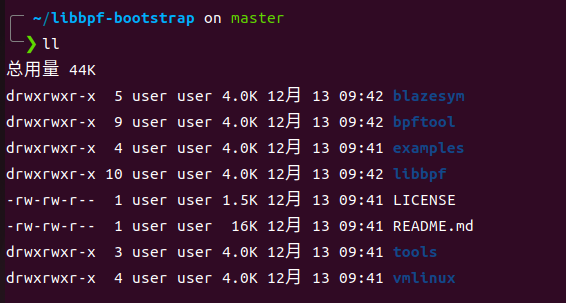 img
img
這里進入example/c中,這里包含一些示例工具 直接make編譯 等編譯完成后,在此目錄下會生成可執行文件
 img
img
先運行一下bootstrap,這里要用root權限運行
 img
img
bootstrap程序會追蹤所有的exec和exit系統調用,每次程序運行時,bootstrap就會輸出運行程序的信息。
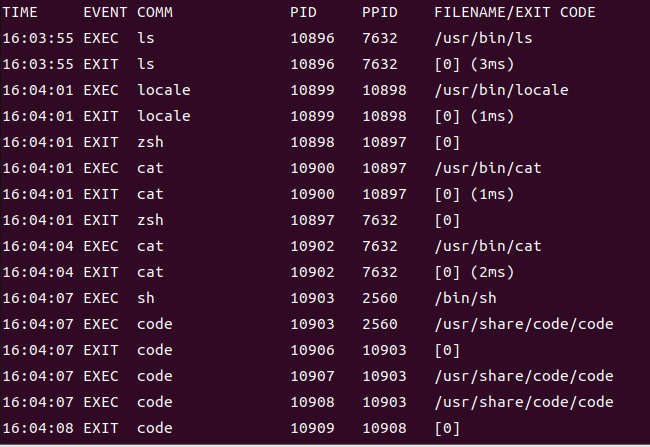 img
img
再看看minimal,這是一個最小ebpf程序。
 img
img
運行后輸出大量信息,最后有提示讓我們運行sudo cat /sys/kernel/debug/tracing/trace_pipe來查看輸出 運行這個命令
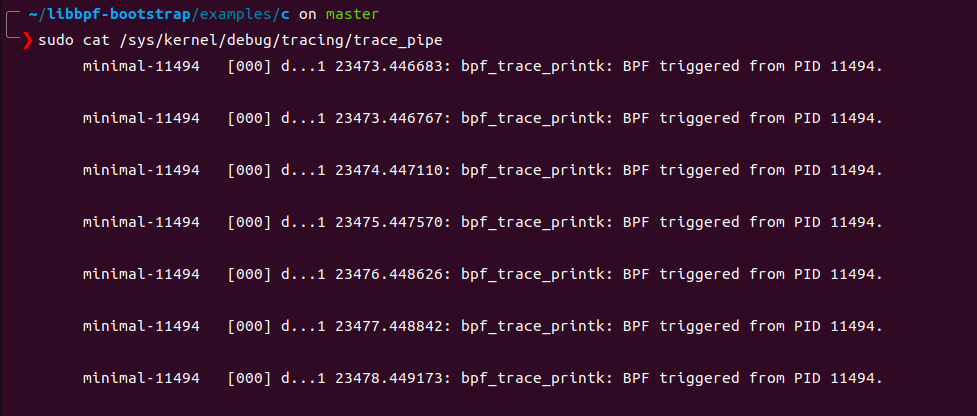 img
img
minimal 會追蹤所有的write系統調用,并打印出調用write的進程的pid 這里看到pid為11494,ps 查詢一下這個進程,發現就是minimal
 img
img
來看看minimal的源碼,這個程序主要有兩個C文件組成,minimal.c和minimal.bpf.c前者為此程序的源碼,后者為插入內核虛擬機的ebpf代碼。
// SPDX-License-Identifier: (LGPL-2.1 OR BSD-2-Clause)
/* Copyright (c) 2020 Facebook */
#include
#include
#include
#include
#include "minimal.skel.h"
static int libbpf_print_fn(enum libbpf_print_level level, const char *format, va_list args)
{
    return vfprintf(stderr, format, args);
}
int main(int argc, char **argv)
{
    struct minimal_bpf *skel;
    int err;
    libbpf_set_strict_mode(LIBBPF_STRICT_ALL);
    /* Set up libbpf errors and debug info callback */
    libbpf_set_print(libbpf_print_fn);
    /* Open BPF application */
    skel = minimal_bpf__open();
    if (!skel) {
        fprintf(stderr, "Failed to open BPF skeleton");
        return 1;
    }
    /* ensure BPF program only handles write() syscalls from our process */
    skel->bss->my_pid = getpid();
    /* Load & verify BPF programs */
    err = minimal_bpf__load(skel);
    if (err) {
        fprintf(stderr, "Failed to load and verify BPF skeleton");
        goto cleanup;
    }
    /* Attach tracepoint handler */
    err = minimal_bpf__attach(skel);
    if (err) {
        fprintf(stderr, "Failed to attach BPF skeleton");
        goto cleanup;
    }
    printf("Successfully started! Please run `sudo cat /sys/kernel/debug/tracing/trace_pipe` "
           "to see output of the BPF programs.");
    for (;;) {
        /* trigger our BPF program */
        fprintf(stderr, ".");
        sleep(1);
    }
    cleanup:
    minimal_bpf__destroy(skel);
    return -err;
}
首先看一下minimal.c的內容,在main函數中首先調用了libbpf_set_strict_mode(LIBBPF_STRICT_ALL);設置為libbpf v1.0模式。此模式下錯誤代碼直接通過函數返回值傳遞,不再需要檢查errno。之后調用libbpf_set_print(libbpf_print_fn);將程序中一個自定義輸出函數設置為調試輸出的回調函數,即運行minimal的這些輸出全都時通過libbpf_print_fn輸出的。
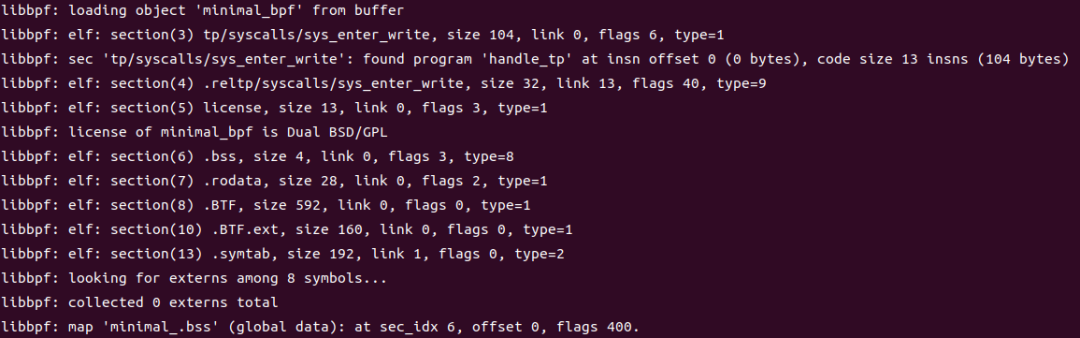 img
img
然后在minimal.c:24調用生成的minimal.skel.h中的預定義函數minimal_bpf__open打開bpf程序,這里返回一個minimal_bpf類型的對象(c中使用結構體模擬對象)。在31行將minimal_bpf對象的bss子對象的my_pid屬性設置為當前進程pid 這里minimal_bpf對象和bss都由minimal.bpf.c代碼編譯而來。minimal.bpf.c經過clang 編譯連接,生成minimal.bpf.o,這是一個elf文件,其中包含bss段,這個段內通常儲存著minimal.bpf.c中所有經過初始化的變量。skel->bss->my_pid = getpid();就是直接將minimal.bpf.o中的my_pid設置為minimal進程的pid。之后在34行調用minimal_bpf__load(skel);加載并驗證ebpf程序。41行調用minimal_bpf__attach(skel);使ebpf程序附加到bpf源碼中聲明的跟蹤點上。此時ebpf程序已經開始運行了。ebpf中通過bpf_printk輸出的內容會寫入linux debugFS中的trace_pipe中。可以使用sudo cat /sys/kernel/debug/tracing/trace_pipe輸出到終端里。之后minimal程序會進入一個死循環,以維持ebpf程序的運行。當用戶按下發送SIGINT信號后就會調用minimal_bpf__destroy(skel);卸載內核中的ebpf程序,之后退出。
接下來看minimal.bpf.c 這是ebpf程序的源碼,是要加載到內核中的ebpf虛擬機中運行的,由于在運行在內核中,具有得天獨厚的地理位置,可以訪問系統中所有資源,再配合上眾多的tracepoint,就可以發揮出強大的追蹤能力。下面是minimal.bpf.c的源碼
// SPDX-License-Identifier: GPL-2.0 OR BSD-3-Clause
/* Copyright (c) 2020 Facebook */
#include
#include
char LICENSE[] SEC("license") = "Dual BSD/GPL";
int my_pid = 0;
SEC("tp/syscalls/sys_enter_write")
int handle_tp(void *ctx)
{
    int pid = bpf_get_current_pid_tgid() >> 32;
    if (pid != my_pid)
        return 0;
    bpf_printk("BPF triggered from PID %d.", pid);
    return 0;
}
minimal.bpf.c會被clang 編譯器編譯為ebpf字節碼,然后通過bpftool將其轉換為minimal.skel.h頭文件,以供minimal.c使用。此代碼中定義并初始化了一個全局變量my_pid,經過編譯連接后此變量會進入elf文件的bss段中。然后,代碼中定義了一個函數int handle_tp(void *ctx),此函數中通過調用bpf_get_current_pid_tgid() >> 32獲取到調用此函數的進程pid
 img
img
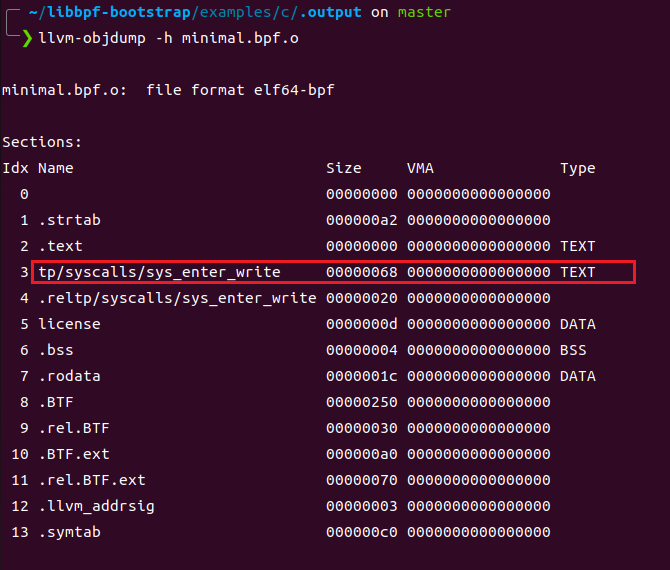
然后比較pid與my_pid的值,如果相同則調用bpf_printk輸出"BPF triggered from PID %d” 這里由于handle_tp函數是通過SEC宏附加在write系統調用上,所以在調用write()時,handle_tp也會被調用,從而實現追蹤系統調用的功能。SEC宏在bpf程序中處于非常重要的地位。可以參考此文檔 SEC宏可以指定ebpf函數附加的點,包括系統調用,靜態tracepoint,動態的kprobe和uprobe,以及USDT等等。Libbpf 期望 BPF 程序使用SEC()宏注釋,其中傳入的字符串參數SEC()確定 BPF 程序類型和可選的附加附加參數,例如 kprobe 程序要附加的內核函數名稱或 cgroup 程序的掛鉤類型。該SEC()定義最終被記錄為 ELF section name。
通過llvm-objdump 可以看到編譯后的epbf程序文件包含一個以追蹤點命名的section
 img
img
ebpf字節碼dump
ebpf程序可以使用llvm-objdump -d dump 出ebpf字節碼
 img
img
bpftrace
bpftrace 提供了一種類似awk 的腳本語言,通過編寫腳本,配合bpftrace支持的追蹤點,可以實現非常強大的追蹤功能
安裝
sudo apt-get update sudo apt-get install -y \ bison \ cmake \ flex \ g++ \ git \ libelf-dev \ zlib1g-dev \ libfl-dev \ systemtap-sdt-dev \ binutils-dev \ libcereal-dev \ llvm-12-dev \ llvm-12-runtime \ libclang-12-dev \ clang-12 \ libpcap-dev \ libgtest-dev \ libgmock-dev \ asciidoctor git clone https://github.com/iovisor/bpftrace mkdir bpftrace/build; cd bpftrace/build; ../build-libs.sh cmake -DCMAKE_BUILD_TYPE=Release .. make -j8 sudo make install
bpftrace命令行參數
# bpftrace
USAGE:
    bpftrace [options] filename
    bpftrace [options] -e 'program'
OPTIONS:
    -B MODE        output buffering mode ('line', 'full', or 'none')
    -d             debug info dry run
    -dd            verbose debug info dry run
    -e 'program'   execute this program
    -h             show this help message
    -I DIR         add the specified DIR to the search path for include files.
    --include FILE adds an implicit #include which is read before the source file is preprocessed.
    -l [search]    list probes
    -p PID         enable USDT probes on PID
    -c 'CMD'       run CMD and enable USDT probes on resulting process
    -q             keep messages quiet
    -v             verbose messages
    -k             emit a warning when a bpf helper returns an error (except read functions)
    -kk            check all bpf helper functions
    --version      bpftrace version
ENVIRONMENT:
    BPFTRACE_STRLEN             [default: 64] bytes on BPF stack per str()
    BPFTRACE_NO_CPP_DEMANGLE    [default: 0] disable C++ symbol demangling
    BPFTRACE_MAP_KEYS_MAX       [default: 4096] max keys in a map
    BPFTRACE_MAX_PROBES         [default: 512] max number of probes bpftrace can attach to
    BPFTRACE_MAX_BPF_PROGS      [default: 512] max number of generated BPF programs
    BPFTRACE_CACHE_USER_SYMBOLS [default: auto] enable user symbol cache
    BPFTRACE_VMLINUX            [default: none] vmlinux path used for kernel symbol resolution
    BPFTRACE_BTF                [default: none] BTF file
EXAMPLES:
bpftrace -l '*sleep*'
    list probes containing "sleep"
bpftrace -e 'kprobe:do_nanosleep { printf("PID %d sleeping...", pid); }'
    trace processes calling sleep
bpftrace -e 'tracepoint:raw_syscalls:sys_enter { @[comm] = count(); }'
    count syscalls by process name
bpftrace程序語法規則
bpftrace語法由以下一個或多個action block結構組成,且語法關鍵字與c語言類似
probe[,probe]
/predicate/ {
  action
}
- ? probe:探針,可以使用bpftrace -l 來查看支持的所有tracepoint和kprobe探針
- ? Predicate(可選):在 / / 中指定 action 執行的條件。如果為True,就執行 action
- ? action:在事件觸發時運行的程序,每行語句必須以 ; 結尾,并且用{}包起來
- ? //:單行注釋
- ? /**/:多行注釋
- ? ->:訪問c結構體成員,例如:bpftrace -e 'tracepoint:syscalls:sys_enter_openat { printf("%s %s", comm, str(args->filename)); }'
- ? struct:結構聲明,在bpftrace腳本中可以定義自己的結構
bpftrace 單行指令
bpftrace -e 選項可以指定運行一個單行程序 1、追蹤openat系統調用
bpftrace -e 'tracepoint:syscalls:sys_enter_openat { printf("%s %s", comm, str(args->filename)); }'
2、系統調用計數
bpftrace -e 'tracepoint:raw_syscalls:sys_enter { @[comm] = count(); }'
3、計算每秒發生的系統調用數量
bpftrace -e 'tracepoint:raw_syscalls:sys_enter { @ = count(); } interval:s:1 { print(@); clear(@); }'
bpftrace腳本文件
還可以將bpftrace程序作為一個腳本文件,并且使用shebang#!/usr/local/bin/bpftrace可以使其獨立運行 例如:
1 #!/usr/local/bin/bpftrace
2
3 tracepoint:syscalls:sys_enter_nanosleep
4 {
5   printf("%s is sleeping.", comm);
6 }
bpftrace探針類型
bpftrace支持以下類型的探針:
- ? kprobe- 內核函數啟動
- ? kretprobe- 內核函數返回
- ? uprobe- 用戶級功能啟動
- ? uretprobe- 用戶級函數返回
- ? tracepoint- 內核靜態跟蹤點
- ? usdt- 用戶級靜態跟蹤點
- ? profile- 定時采樣
- ? interval- 定時輸出
- ? software- 內核軟件事件
- ? hardware- 處理器級事件
